Netlas API (v1)
Download OpenAPI specification:
To interact with the Netlas API, you will need an API client or at least the curl command-line utility. Alternatively, you can use the Netlas CLI tool or the Netlas Python SDK.
This specification includes code samples for all of these options.
Setting Up an API Client
Most modern API clients support OpenAPI v3.1 imports. Click Download at the top of this page, then import the file into your preferred API client.
✅ We've confirmed that imports work smoothly in the following clients:
| API Client | Steps to Import |
|---|---|
| Postman | In Import Settings, set Folder Organization to Tags for better structure. |
| Insomnia | Collections → Create, then click the collection name in the top-left corner and choose Import From File. |
| Bruno | Click Import Collection → OpenAPI V3 File, then choose a local folder to store the workspace. |
| Scalar | Don’t forget to configure the API key in the collection's authentication settings. |
⚠️ For tools that still expect OpenAPI 3.0, use the OpenAPI 3.0 JSON, for example with Thunder Client, RapidAPI for Mac (Paw), and other older OpenAPI-based import and code generation workflows.
Netlas CLI Tool
The Netlas CLI tool is ideal for users who prefer the command line or Bash scripting. It allows you to interact with Netlas just like any other terminal application.
To install the CLI via Homebrew:
brew tap netlas-io/netlas
brew install netlas
Or install it using pipx:
pipx install netlas
Netlas Python SDK
The Netlas Python SDK is designed for Python developers. It provides a convenient way to work with the API, with built-in handling for common errors.
Install the SDK using pip:
pip install netlas
The Netlas CLI tool is included with the SDK, so it becomes available automatically after SDK installation. Both the Netlas Python SDK and CLI tool are open-source and available under the MIT license in the Github Netlas repository.

Each registered Netlas user receives a unique API key. You can find your API key on the profile page, accessible from the top-right menu in the web application.
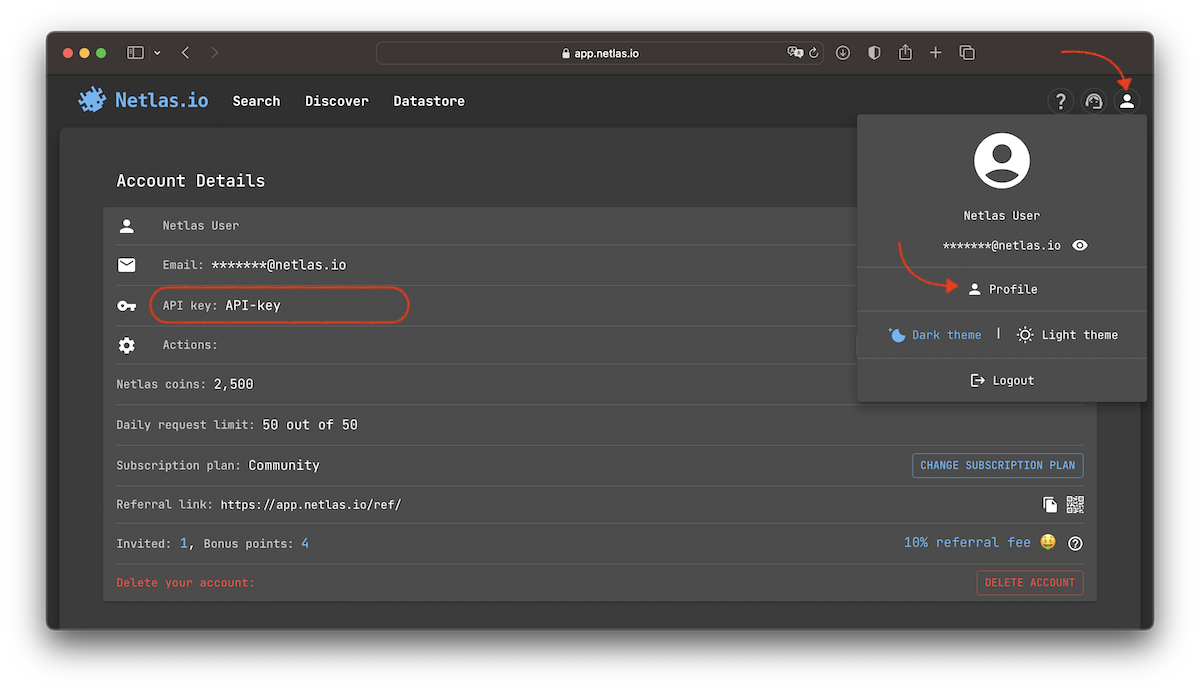
Include your API key as a Bearer token in the Authorization header to authorize your requests. The curl examples in this manual will work as-is if you export the API key as the NETLAS_API_KEY environment variable:
export NETLAS_API_KEY=put_your_key_here
curl -X 'GET' "https://app.netlas.io/api/host/" \
  -H "Authorization: Bearer $NETLAS_API_KEY"
Netlas API authorization follows RFC 6750, The OAuth 2.0 Authorization Framework: Bearer Token Usage.
The
X-API-Keyheader was previously used for authentication and is still supported, but considered deprecated and may be removed in future versions.
If you are using the Netlas CLI or SDK, securely save your API key locally:
netlas savekey "YOUR_API_KEY"
The Netlas CLI tool automatically uses the saved key.
To fetch saved key in Python:
import netlas
api_key = netlas.helpers.get_api_key()
⚠️ FYI: You may be eligible for a special subscription if you're using Netlas for educational purposes, building an integration, or writing for a blog or journal.
Read more →
To ensure fair usage and optimal performance, the Netlas API enforces the following rate limits:
- 60 requests per minute for search and count operations, excluding certificate searches.
- 3 requests per minute for search and count operations involving certificate data collections.
If these limits are exceeded, the API responds with Error 429 (Too Many Requests) and includes a Retry-After header indicating the number of seconds to wait before retrying.
The Netlas CLI and SDK are configured by default to automatically handle rate limit errors.
When using the SDK, you can customize this behavior by setting the throttling and retry parameters in the search methods.
This allows you to either disable automatic handling or specify the number of retry attempts.
To manage rate limiting manually you you can catch and handle the ThrottlingError exception in your code:
import netlas
import time

nc = netlas.Netlas()

for i in range(65):
    try:
        nc.host(host=None, fields=["*"], exclude_fields=True, throttling=False)
    except netlas.ThrottlingError as e:
        time.sleep(e.retry_after) # Wait for the specified time before retrying
⚠️ Important: Always handle Netlas API errors correctly. Ignoring rate limits or other errors may result in temporary access restrictions. Read more about blocking policy in the FAQ section.
Retrieves a summary of Netlas data for a specific IP address or domain name.
The Host Info endpoint supports queries by IP or domain only, but returns aggregated data from all Netlas data collections in a single response.
The same data available in the Netlas web interface via the IP/Domain Info tool.
Host Summary
Retrieve the latest available data for {host}.
path Parameters
required | IPv4 (string) or Domain (string) The IP address or domain name for which data should be retrieved. |
query Parameters
| fields | Array of strings (fields) Default: "*" Examples: fields=* fields=ip fields=ptr[0],whois.abuse You can control the amount of output data by specifying which fields to include or exclude in the response.
Use the |
| source_type | string (source_type) Default: "include" Enum: "include" "exclude" Specify
|
| public_indices_only | boolean (public_indices_only) Default: false Example: public_indices_only=true By default, data is requested from both private and public indices, returning the most recent results. Use this query parameter to restrict the search to public indices only. |
Responses
Request samples
- Curl
- Netlas CLI
- Python
# IP query example
curl -s -X GET \
    "https://app.netlas.io/api/host/23.215.0.136/" \
    -H "Authorization: Bearer $NETLAS_API_KEY"

# Domain query example
curl -s -X GET \
    "https://app.netlas.io/api/host/example.com/" \
    -H "Authorization: Bearer $NETLAS_API_KEY"

# Filtering output
curl -s -X GET \
"https://app.netlas.io/api/host/google.com/" \
  -G \
    --data-urlencode 'fields=whois.registrant.organization' \
    --data-urlencode 'source_type=include' \
  -H "Authorization: Bearer $NETLAS_API_KEY"
Response samples
- 200
- 400
- 402
- 429
- 500
- 504
{- "type": "ip",
- "ip": "23.215.0.136",
- "ptr": [
- "a23-215-0-136.deploy.static.akamaitechnologies.com"
], - "geo": {
- "continent": "North America",
- "country": "US",
- "tz": "America/Chicago",
- "location": {
- "lat": 37.751,
- "lon": -97.822
}, - "accuracy": 1000
}, - "privacy": {
- "vpn": false,
- "proxy": false,
- "tor": false
}, - "organization": "Example Technologies, Inc.",
- "domains": [
- "example.com",
- "example.net"
], - "domains_count": 2,
- "whois": {
- "@timestamp": "2025-01-07T05:17:39",
- "raw": "Raw WHOIS data in the form of a string will be here.\n\nThe rest of the document contains the same data in parsed form.",
- "ip": {
- "gte": "23.214.224.0",
- "lte": "23.215.8.255"
}, - "related_nets": [ ],
- "net": {
- "country": "US",
- "address": "145 Broadway",
- "city": "Cambridge",
- "created": "2013-07-12",
- "range": "23.192.0.0 - 23.223.255.255",
- "description": "Akamai Technologies, Inc.",
- "handle": "NET-23-192-0-0-1",
- "organization": "Akamai Technologies, Inc. (AKAMAI)",
- "name": "AKAMAI",
- "start_ip": "23.192.0.0",
- "cidr": [
- "23.192.0.0/11"
], - "net_size": 2097151,
- "state": "MA",
- "postal_code": "02142",
- "updated": "2013-08-09",
- "end_ip": "23.223.255.255",
- "contacts": {
- "phones": [
- "+1-617-274-7134",
- "+1-617-444-2535",
- "+1-617-444-0017"
]
}
}, - "asn": {
- "number": [
- "16625"
], - "registry": "arin",
- "country": "US",
- "name": "AKAMAI-AS",
- "cidr": "23.214.224.0/19",
- "updated": "2013-07-12"
}
}, - "ports": [
- {
- "protocol": "http",
- "prot4": "tcp",
- "port": 80,
- "prot7": "http"
}, - {
- "protocol": "https",
- "prot4": "tcp",
- "port": 443,
- "prot7": "http"
}
], - "software": [
- {
- "tag": [
- {
- "azure_cdn": {
- "version": ""
}, - "name": "azure_cdn",
- "fullname": "Azure CDN",
- "category": [
- "CDN"
]
}
],
}
], - "ioc": [
- {
- "lseen": "2024-01-19T00:00Z",
- "fseen": "2024-01-19T00:00Z",
- "domain": "example.com",
- "tags": [
- "malware"
]
}
], - "source": [
- {
- "id": 4701,
- "name": "perimeter-1741688290-9rc7tkern-demo-1-responses",
- "availability": "private",
- "label": "23.215.0.136, example.com"
}
]
}Caller’s Host Summary
Retrieves the latest available data for the IP address of the client making the request.
Use this method to obtain information about your own IP address.
query Parameters
| fields | Array of strings (fields) Default: "*" Examples: fields=* fields=ip fields=ptr[0],whois.abuse You can control the amount of output data by specifying which fields to include or exclude in the response.
Use the |
| source_type | string (source_type) Default: "include" Enum: "include" "exclude" Specify
|
| public_indices_only | boolean (public_indices_only) Default: false Example: public_indices_only=true By default, data is requested from both private and public indices, returning the most recent results. Use this query parameter to restrict the search to public indices only. |
Responses
Request samples
- Curl
- Netlas CLI
- Python
curl -s -X GET \
    "https://app.netlas.io/api/host/" \
    -H "Authorization: Bearer $NETLAS_API_KEY"
Response samples
- 200
- 400
- 402
- 429
- 500
- 504
{- "type": "ip",
- "ip": "23.215.0.136",
- "ptr": [
- "a23-215-0-136.deploy.static.akamaitechnologies.com"
], - "geo": {
- "continent": "North America",
- "country": "US",
- "tz": "America/Chicago",
- "location": {
- "lat": 37.751,
- "lon": -97.822
}, - "accuracy": 1000
}, - "privacy": {
- "vpn": false,
- "proxy": false,
- "tor": false
}, - "organization": "Example Technologies, Inc.",
- "domains": [
- "example.com",
- "example.net"
], - "domains_count": 2,
- "whois": {
- "@timestamp": "2025-01-07T05:17:39",
- "raw": "Raw WHOIS data in the form of a string will be here.\n\nThe rest of the document contains the same data in parsed form.",
- "ip": {
- "gte": "23.214.224.0",
- "lte": "23.215.8.255"
}, - "related_nets": [ ],
- "net": {
- "country": "US",
- "address": "145 Broadway",
- "city": "Cambridge",
- "created": "2013-07-12",
- "range": "23.192.0.0 - 23.223.255.255",
- "description": "Akamai Technologies, Inc.",
- "handle": "NET-23-192-0-0-1",
- "organization": "Akamai Technologies, Inc. (AKAMAI)",
- "name": "AKAMAI",
- "start_ip": "23.192.0.0",
- "cidr": [
- "23.192.0.0/11"
], - "net_size": 2097151,
- "state": "MA",
- "postal_code": "02142",
- "updated": "2013-08-09",
- "end_ip": "23.223.255.255",
- "contacts": {
- "phones": [
- "+1-617-274-7134",
- "+1-617-444-2535",
- "+1-617-444-0017"
]
}
}, - "asn": {
- "number": [
- "16625"
], - "registry": "arin",
- "country": "US",
- "name": "AKAMAI-AS",
- "cidr": "23.214.224.0/19",
- "updated": "2013-07-12"
}
}, - "ports": [
- {
- "protocol": "http",
- "prot4": "tcp",
- "port": 80,
- "prot7": "http"
}, - {
- "protocol": "https",
- "prot4": "tcp",
- "port": 443,
- "prot7": "http"
}
], - "software": [
- {
- "tag": [
- {
- "azure_cdn": {
- "version": ""
}, - "name": "azure_cdn",
- "fullname": "Azure CDN",
- "category": [
- "CDN"
]
}
],
}
], - "ioc": [
- {
- "lseen": "2024-01-19T00:00Z",
- "fseen": "2024-01-19T00:00Z",
- "domain": "example.com",
- "tags": [
- "malware"
]
}
], - "source": [
- {
- "id": 4701,
- "name": "perimeter-1741688290-9rc7tkern-demo-1-responses",
- "availability": "private",
- "label": "23.215.0.136, example.com"
}
]
}Access continuously updated internet scan data collected by Netlas.
The same data available in the Netlas web interface via the Responses Search tool.
Responses Search
Searches for q in the selected indices and returns up to 20 search results, starting from the start+1 document.
❗️ This method allows retrieving only the first 10,000 search results.
Use it when the expected number of results is relatively low or to craft and refine a query. Use the Download endpoint to fetch results without pagination or quantity limitations.
query Parameters
| q required | string (q) Examples:
The query string used for searching. See Query Syntax for more details. |
| start | integer (start) [ 0 .. 9980 ] Default: 0 Example: start=20 Use for pagination. Offset from the first search result to return. |
| indices | string (indices) Examples:
A single index label or a comma-separated string of index labels to search in. Do not use a JSON array or repeat the query parameter. ℹ️ Unlike other search tools, Responses search does not have a default index. |
| fields | Array of strings (fields) Default: "*" Examples: fields=* fields=ip fields=ptr[0],whois.abuse You can control the amount of output data by specifying which fields to include or exclude in the response.
Use the |
| source_type | string (source_type) Default: "include" Enum: "include" "exclude" Specify
|
Responses
Request samples
- Curl
- Netlas CLI
- Python
curl -s -X GET \
    "https://app.netlas.io/api/responses/" \
    -G \
    --data-urlencode "q=host:example.com" \
    --data-urlencode "fields=ip,uri" \
    -H "Authorization: Bearer $NETLAS_API_KEY"
Response samples
- 200
- 400
- 402
- 403
- 429
- 500
- 504
{- "items": [
- {
- "highlight": {
- "host": "example.com"
}, - "data": {
- "last_updated": "2025-02-13T14:33:05.761Z",
- "jarm": "28d28d28d00028d00042d42d0000005af340c9af4dda1ac7f5ed68d47c4416",
- "isp": "Akamai Technologies",
- "ip": "23.192.228.84",
- "certificate": {
- "issuer_dn": "C=US, O=DigiCert Inc, CN=DigiCert Global G3 TLS ECC SHA384 2020 CA1",
- "fingerprint_md5": "c33979ff8bc19a94820d6804b3681881",
- "chain": [
- {
- "issuer_dn": "C=US, O=DigiCert Inc, OU=www.digicert.com, CN=DigiCert Global Root G3",
- "fingerprint_md5": "bf44da68b5abcb0a48c8471806ff9706",
- "signature": {
- "valid": false,
- "signature_algorithm": {
- "name": "ECDSA-SHA384",
- "oid": "1.2.840.10045.4.3.3"
}, - "value": "MGUCMH4mWG7uiOwM3RVB7nq4mZlw0WJlT6AgnkexW8GyZzEdzHJ6ryJyQEJuZYT+h0sPGQIxAOa/1q40h1s/Z8cdqG/VEni15ocxRKldxrh4zM/v1DJYEf86hQY8HYRv0/X52jMcpA==",
- "self_signed": false
}, - "redacted": false,
- "subject": {
- "country": [
- "US"
], - "organization": [
- "DigiCert Inc"
], - "common_name": [
- "DigiCert Global G3 TLS ECC SHA384 2020 CA1"
]
}, - "serial_number": "14626237344301700912191253757342652550",
- "version": 3,
- "issuer": {
- "country": [
- "US"
], - "organization": [
- "DigiCert Inc"
], - "common_name": [
- "DigiCert Global Root G3"
], - "organizational_unit": [
- "www.digicert.com"
]
}, - "fingerprint_sha256": "0587d6bd2819587ab90fb596480a5793bd9f7506a3eace73f5eab366017fe259",
- "tbs_noct_fingerprint": "b01920744bbb76c9ab053e01e07b7e050e473d20f79f7bea435fafe43c9d242f",
- "tbs_fingerprint": "b01920744bbb76c9ab053e01e07b7e050e473d20f79f7bea435fafe43c9d242f",
- "extensions": {
- "subject_key_id": "8a23eb9e6bd7f9375df96d2139769aa167de10a8",
- "certificate_policies": [
- {
- "id": "2.16.840.1.114412.2.1"
}, - {
- "id": "2.23.140.1.1"
}, - {
- "id": "2.23.140.1.2.1"
}, - {
- "id": "2.23.140.1.2.2"
}, - {
- "id": "2.23.140.1.2.3"
}
], - "authority_key_id": "b3db48a4f9a1c5d8ae3641cc1163696229bc4bc6",
- "key_usage": {
- "digital_signature": true,
- "certificate_sign": true,
- "crl_sign": true,
- "value": 97
}, - "authority_info_access": {
}, - "basic_constraints": {
- "max_path_len": 0,
- "is_ca": true
}, - "extended_key_usage": {
- "client_auth": true,
- "server_auth": true
}
}, - "subject_dn": "C=US, O=DigiCert Inc, CN=DigiCert Global G3 TLS ECC SHA384 2020 CA1",
- "fingerprint_sha1": "9577f91fe86c27d9912129730e8166373fc2eeb8",
- "signature_algorithm": {
- "name": "ECDSA-SHA384",
- "oid": "1.2.840.10045.4.3.3"
}, - "spki_subject_fingerprint": "a7cb399df47e982018276c3397790bdef648e6d87b2f7b90d551f719ac6098c4",
- "validity": {
- "length": 315532799,
- "start": "2021-04-14T00:00:00Z",
- "end": "2031-04-13T23:59:59Z"
}, - "validation_level": "EV"
}
], - "signature": {
- "valid": false,
- "signature_algorithm": {
- "name": "ECDSA-SHA384",
- "oid": "1.2.840.10045.4.3.3"
}, - "value": "MGUCMQD5poJGU9tv5Vj67hq8/Jobt+9QMmo3wrCWtcPhem1PtAv4PTf4ED8VQSjd0PWLPfsCMGRjeOGy4sBbulawNu1f9DDGnqQ2wriOHX9GO9X/brSzFDAz8Yzu3T5PS4/Yv5jXZQ==",
- "self_signed": false
}, - "redacted": false,
- "subject": {
- "country": [
- "US"
], - "province": [
- "California"
], - "organization": [
- "Internet Corporation for Assigned Names and Numbers"
], - "locality": [
- "Los Angeles"
], - "common_name": [
- "*.example.com"
]
}, - "serial_number": "14416812407440461216471976375640436634",
- "version": 3,
- "issuer": {
- "country": [
- "US"
], - "organization": [
- "DigiCert Inc"
], - "common_name": [
- "DigiCert Global G3 TLS ECC SHA384 2020 CA1"
]
}, - "fingerprint_sha256": "455943cf819425761d1f950263ebf54755d8d684c25535943976f488bc79d23b",
- "tbs_noct_fingerprint": "bc8ace8a15de0d8136c6f642e1d1e367a3dd38d5534e3fc4f52c5ee6b86cb25d",
- "tbs_fingerprint": "ad7d5aa4244532a22369dfa25a851e180cb34a39d90efba98022f0f9832e0bd9",
- "extensions": {
- "subject_key_id": "f0c16a320decdac7ea8fcd0d6d191259d1be72ed",
- "crl_distribution_points": [
], - "authority_key_id": "8a23eb9e6bd7f9375df96d2139769aa167de10a8",
- "key_usage": {
- "key_agreement": true,
- "digital_signature": true,
- "value": 17
}, - "subject_alt_name": {
- "dns_names": [
- "*.example.com",
- "example.com"
]
}, - "signed_certificate_timestamps": [
- {
- "log_id": "DleUvPOuqT4zGyyZB7P3kN+bwj1xMiXdIaklrGHFTiE=",
- "signature": "BAMARTBDAh8kFw9aTHzSKTu4thbo4a81i8ng2Y5HZFdz26+IU8fpAiBS265R6cchPlQ1Yl98EFGrfW1QaLtkNNKuszR/jPVVrg==",
- "version": 0,
- "timestamp": 1736902885
}, - {
- "log_id": "ZBHEbKQS7KeJHKICLgC8q08oB9QeNSer6v7VA8l9zfA=",
- "signature": "BAMARjBEAiBwrujYB4VdUL4n/xuwR6u3IjBh/I3XIf8cuC862JXrFwIgcjBTLw4RoOLGJtTLKwxlXnXMKROHjdEbmXBRplscCXI=",
- "version": 0,
- "timestamp": 1736902885
}, - {
- "log_id": "SZybad4dfOz8Nt7Nh2SmuFuvCoeAGdFVUvvp6ynd+MM=",
- "signature": "BAMARzBFAiBoWHrvIRDaXCCbdfXqfaJaMRAUgjZvZ+k420FWJtlVbAIhAPmmyqNcNiwgRvWHKHRLxsE3c7i7awD3OKwoiViNmDzC",
- "version": 0,
- "timestamp": 1736902885
}
], - "authority_info_access": {
}, - "basic_constraints": {
- "is_ca": false
}, - "extended_key_usage": {
- "client_auth": true,
- "server_auth": true
}
}, - "subject_dn": "C=US, ST=California, L=Los Angeles, O=Internet Corporation for Assigned Names and Numbers, CN=*.example.com",
- "names": [
- "*.example.com",
- "example.com"
], - "fingerprint_sha1": "310db7af4b2bc9040c8344701aca08d0c69381e3",
- "signature_algorithm": {
- "name": "ECDSA-SHA384",
- "oid": "1.2.840.10045.4.3.3"
}, - "spki_subject_fingerprint": "9d77c9a308deb7b5d91be7d8d5e10587bd9381a70913cfad1883b9bdcd825d43",
- "validity": {
- "length": 31622399,
- "start": "2025-01-15T00:00:00Z",
- "end": "2026-01-15T23:59:59Z"
}, - "validation_level": "OV"
}, - "host_type": "domain",
- "target": {
- "ip": "3.233.61.204",
- "type": "ip"
}, - "prot7": "http",
- "ptr": [
- "a23-192-228-84.deploy.static.akamaitechnologies.com"
], - "geo": {
- "continent": "North America",
- "country": "US",
- "city": "Santa Clara",
- "tz": "America/Los_Angeles",
- "location": {
- "accuracy": 20,
- "long": -121.9543,
- "lat": 37.353
}, - "postal": "95052",
- "subdivisions": [
- "CA"
]
}, - "path": "/",
- "protocol": "https",
- "prot4": "tcp",
- "@timestamp": "2025-02-13T14:33:05.761Z",
- "whois": {
- "related_nets": [ ],
- "net": {
- "country": "US",
- "address": "145 Broadway",
- "city": "Cambridge",
- "created": "2013-07-12",
- "range": "23.192.0.0 - 23.223.255.255",
- "description": "Akamai Technologies, Inc.",
- "handle": "NET-23-192-0-0-1",
- "organization": "Akamai Technologies, Inc. (AKAMAI)",
- "start_ip": "23.192.0.0",
- "name": "AKAMAI",
- "net_size": 2097151,
- "cidr": [
- "23.192.0.0/11"
], - "state": "MA",
- "postal_code": "02142",
- "updated": "2013-08-09",
- "end_ip": "23.223.255.255",
- "contacts": {
- "phones": [
- "+1-617-444-0017",
- "+1-617-444-2535",
- "+1-617-274-7134"
]
}
}, - "asn": {
- "registry": "arin",
- "country": "US",
- "number": [
- "20940"
], - "name": "AKAMAI-ASN1",
- "cidr": "23.192.164.0/24",
- "updated": "2013-07-12"
}
}, - "port": 443,
- "domain": [
- "postleitzahlsuche.de",
- "staging-one.maz-online.de"
], - "host": "example.com",
- "iteration": "38",
- "http": {
- "headers": {
- "date": [
- "Thu, 13 Feb 2025 13:56:57 GMT"
], - "accept_ranges": [
- "bytes"
], - "content_type": [
- "text/html"
], - "vary": [
- "Accept-Encoding"
], - "cache_control": [
- "max-age=503"
], - "connection": [
- "keep-alive"
], - "etag": [
- "\"84238dfc8092e5d9c0dac8ef93371a07:1736799080.121134\""
], - "last_modified": [
- "Mon, 13 Jan 2025 20:11:20 GMT"
], - "alt_svc": [
- "h3=\":443\"; ma=93600,h3-29=\":443\"; ma=93600,h3-Q050=\":443\"; ma=93600,quic=\":443\"; ma=93600; v=\"46,43\""
]
}, - "status_code": 200,
- "body_sha256": "ea8fac7c65fb589b0d53560f5251f74f9e9b243478dcb6b3ea79b5e36449c8d9",
- "meta": [
- "charset=\"utf-8\" ",
- "http-equiv=\"Content-type\" content=\"text/html; charset=utf-8\" ",
- "name=\"viewport\" content=\"width=device-width, initial-scale=1\" "
], - "http_version": {
- "major": 1,
- "minor": 1,
- "name": "HTTP/1.1"
}, - "body": "<!doctype html>\n<html>\n<head>\n <title>Example Domain</title>\n\n <meta charset=\"utf-8\" />\n <meta http-equiv=\"Content-type\" content=\"text/html; charset=utf-8\" />\n <meta name=\"viewport\" content=\"width=device-width, initial-scale=1\" />\n <style type=\"text/css\">\n body {\n background-color: #f0f0f2;\n margin: 0;\n padding: 0;\n font-family: -apple-system, system-ui, BlinkMacSystemFont, \"Segoe UI\", \"Open Sans\", \"Helvetica Neue\", Helvetica, Arial, sans-serif;\n \n }\n div {\n width: 600px;\n margin: 5em auto;\n padding: 2em;\n background-color: #fdfdff;\n border-radius: 0.5em;\n box-shadow: 2px 3px 7px 2px rgba(0,0,0,0.02);\n }\n a:link, a:visited {\n color: #38488f;\n text-decoration: none;\n }\n @media (max-width: 700px) {\n div {\n margin: 0 auto;\n width: auto;\n }\n }\n </style> \n</head>\n\n<body>\n<div>\n <h1>Example Domain</h1>\n <p>This domain is for use in illustrative examples in documents. You may use this\n domain in literature without prior coordination or asking for permission.</p>\n <p><a href=\"https://www.iana.org/domains/example\">More information...</a></p>\n</div>\n</body>\n</html>\n",
- "status_line": "200 OK",
- "title": "Example Domain",
- "content_length": -1
}, - "scan_date": "2025-02-13"
}
}
]
}Responses Count
Counts the number of documents matching the search query q in the selected indices.
- If there are fewer than 1,000 results, the method returns the exact count.
- If there are more than 1,000 results, the count is estimated with an error margin not exceeding 3%.
query Parameters
| q required | string (q) Example: q=ip:"23.192.0.0/11" The query string used for searching. See Query Syntax for more details. |
| indices | string (indices) Examples:
A single index label or a comma-separated string of index labels to search in. Do not use a JSON array or repeat the query parameter. ℹ️ Unlike other search tools, Responses search does not have a default index. |
Responses
Request samples
- Curl
- Netlas CLI
- Python
curl -s -X GET \
    "https://app.netlas.io/api/responses_count/" \
    -G \
    --data-urlencode 'q=ip:"23.192.0.0/11"' \
    -H "Authorization: Bearer $NETLAS_API_KEY"
Response samples
- 200
- 400
- 403
- 429
- 500
- 504
{- "count": 123
}Responses Download
Retrieves size search results matching the query q in the selected indices.
The Netlas SDK and CLI tool additionally include a download_all() method and an --all key that allow you to query all available results.
Request Body schema: application/jsonrequired
| q required | string (q) The query string used for searching. See Query Syntax for more details. |
| size required | integer Number of documents to download. Call corresponding Count endpoint to get a number of available documents. |
| indices | string (indices) Index labels to search in, supplied as a single string. For one index, use Use this format in both URL query parameters and JSON request bodies. Do not use a JSON array or repeat the Omit this parameter to use the endpoint's default index selection. Call indices endpoint to get the list of available indices. |
| fields required | Array of strings (fields) You can control the amount of output data by specifying which fields to include or exclude in the response.
Use the |
| source_type required | string (source_type) Enum: "include" "exclude" Specify
|
| type | string Default: "json" Enum: "json" "csv" Download output format.
Note: the API may still respond with |
Responses
Request samples
- Payload
- Curl
- Netlas CLI
- Python
{- "q": "ip:\"23.192.0.0/11\"",
- "size": 100,
- "fields": [
- "uri",
- "host_type",
- "port",
- "prot4",
- "prot7",
- "protocol"
], - "source_type": "include",
- "indices": "2026-09-29"
}Response samples
- 200
- 400
- 401
- 402
- 403
- 429
- 500
- 504
[- {
- "data": {
- "path": "/ClientPortal/Login.aspx",
- "protocol": "https",
- "prot4": "tcp",
- "port": 443,
- "ip": "23.218.66.148",
- "host": "ww4.autotask.net",
- "host_type": "domain",
- "prot7": "http",
- "ptr": [
- "a23-218-66-148.deploy.static.akamaitechnologies.com"
]
}
}, - {
- "data": {
- "path": "/taxfreedom/",
- "protocol": "http",
- "prot4": "tcp",
- "port": 80,
- "ip": "23.218.68.10",
- "host": "turbotax.intuit.com",
- "host_type": "domain",
- "prot7": "http",
- "ptr": [
- "a23-218-68-10.deploy.static.akamaitechnologies.com"
]
}
}, - {
- "data": {
- "path": "/taxfreedom/",
- "protocol": "https",
- "prot4": "tcp",
- "port": 443,
- "ip": "23.218.68.10",
- "host": "turbotax.intuit.com",
- "host_type": "domain",
- "prot7": "http",
- "ptr": [
- "a23-218-68-10.deploy.static.akamaitechnologies.com"
]
}
}, - {
- "data": {
- "path": "/saml/login/8141776/87e9",
- "protocol": "https",
- "prot4": "tcp",
- "port": 443,
- "ip": "23.200.189.212",
- "host": "lastpass.com",
- "host_type": "domain",
- "prot7": "http",
- "ptr": [
- "a23-200-189-212.deploy.static.akamaitechnologies.com"
]
}
}, - {
- "data": {
- "path": "/61b1ba49b79d/intresseanmlan-mi-ntverket-2018-ett-arbetsseminarium-workshop-med-dr-stephen/",
- "protocol": "https",
- "prot4": "tcp",
- "port": 443,
- "ip": "23.209.18.242",
- "host": "mailchi.mp",
- "host_type": "domain",
- "prot7": "http",
- "ptr": [
- "a23-209-18-242.deploy.static.akamaitechnologies.com"
]
}
}
]Responses Facet Search
Searches for q in the selected indices and groups results by the facets field.
query Parameters
| q required | string (q) Example: q=ip:"23.192.0.0/11" The query string used for searching. See Query Syntax for more details. |
| facets required | Array of strings (facets) Example: facets=protocol A list of fields to group search results by. |
| indices | string (indices) Examples:
A single index label or a comma-separated string of index labels to search in. Do not use a JSON array or repeat the query parameter. ℹ️ Unlike other search tools, Responses search does not have a default index. |
| size | integer (facet_search_size) [ 1 .. 1000 ] Default: 100 Number of search results to return for each facet. |
Responses
Request samples
- Curl
- Netlas CLI
- Python
curl -s -X GET \
    "https://app.netlas.io/api/responses_facet/" \
    -G \
    --data-urlencode 'q=ip:"23.192.0.0/11"' \
    --data-urlencode 'facets=protocol' \
    -H "Authorization: Bearer $NETLAS_API_KEY"
Response samples
- 200
- 400
- 402
- 403
- 429
- 500
- 504
{- "aggregations": [
- {
- "key": [
- "http"
], - "doc_count": 1675766
}, - {
- "key": [
- "https"
], - "doc_count": 1161498
}, - {
- "key": [
- "dns_tcp"
], - "doc_count": 15834
}, - {
- "key": [
- "dns"
], - "doc_count": 14602
}, - {
- "key": [
- "ssh"
], - "doc_count": 973
}
]
}Information about domain names, their corresponding IP addresses, and other types of DNS records.
The same data available in the Netlas web interface via the DNS Search tool.
Domains Search
Searches for q in the selected indices and returns up to 20 search results, starting from the start+1 document.
❗️ This method allows retrieving only the first 10,000 search results.
Use it when the expected number of results is relatively low or to craft and refine a query. Use the Download endpoint to fetch results without pagination or quantity limitations.
query Parameters
| q required | string (q) Examples:
The query string used for searching. See Query Syntax for more details. |
| start | integer (start) [ 0 .. 9980 ] Default: 0 Example: start=20 Use for pagination. Offset from the first search result to return. |
| indices | string (indices) Examples: indices=2026-10-01 indices=2026-10-01,2026-09-08 Index labels to search in, supplied as a single string. For one index, use Use this format in both URL query parameters and JSON request bodies. Do not use a JSON array or repeat the Omit this parameter to use the endpoint's default index selection. Call indices endpoint to get the list of available indices. |
| fields | Array of strings (fields) Default: "*" Examples: fields=* fields=domain,a You can control the amount of output data by specifying which fields to include or exclude in the response.
Use the |
| source_type | string (source_type) Default: "include" Enum: "include" "exclude" Specify
|
Responses
Request samples
- Curl
- Netlas CLI
- Python
curl -s -X GET \
    "https://app.netlas.io/api/domains/" \
    -G \
    --data-urlencode "q=domain:example.com" \
    --data-urlencode "fields=a,aaaa,ns,mx,txt" \
    -H "Authorization: Bearer $NETLAS_API_KEY"
Response samples
- 200
- 400
- 402
- 403
- 429
- 500
- 504
{- "items": [
- {
- "data": {
- "txt": [
- "_k2n1y4vw3qtb4skdx9e7dxt97qrmmq9",
- "v=spf1 -all"
], - "a": [
- "23.192.228.80",
- "23.192.228.84",
- "23.215.0.136",
- "96.7.128.175",
- "23.215.0.138",
- "96.7.128.198"
], - "last_updated": "2025-02-18T20:14:08.642Z",
- "@timestamp": "2025-02-18T20:14:08.642Z",
- "level": 2,
- "zone": "com",
- "ns": [
- "a.iana-servers.net",
- "b.iana-servers.net"
], - "domain": "example.com",
- "aaaa": [
- "2600:1408:ec00:36::1736:7f24",
- "2600:1406:bc00:53::b81e:94ce",
- "2600:1406:3a00:21::173e:2e66",
- "2600:1406:bc00:53::b81e:94c8",
- "2600:1408:ec00:36::1736:7f31",
- "2600:1406:3a00:21::173e:2e65"
]
}
}
]
}Domains Count
Counts the number of documents matching the search query q in the selected indices.
- If there are fewer than 1,000 results, the method returns the exact count.
- If there are more than 1,000 results, the count is estimated with an error margin not exceeding 3%.
query Parameters
| q required | string (q) Example: q=domain:*.example.com a:* The query string used for searching. See Query Syntax for more details. |
| indices | string (indices) Examples: indices=2026-10-01 indices=2026-10-01,2026-09-08 Index labels to search in, supplied as a single string. For one index, use Use this format in both URL query parameters and JSON request bodies. Do not use a JSON array or repeat the Omit this parameter to use the endpoint's default index selection. Call indices endpoint to get the list of available indices. |
Responses
Request samples
- Curl
- Netlas CLI
- Python
curl -s -X GET \
    "https://app.netlas.io/api/domains_count/" \
    -G \
    --data-urlencode "q=domain:*.example.com a:*" \
    -H "Authorization: Bearer $NETLAS_API_KEY"
Response samples
- 200
- 400
- 403
- 429
- 500
- 504
{- "count": 123
}Domains Download
Retrieves size search results matching the query q in the selected indices.
The Netlas SDK and CLI tool additionally include a download_all() method and an --all key that allow you to query all available results.
Request Body schema: application/jsonrequired
| q required | string (q) The query string used for searching. See Query Syntax for more details. |
| size required | integer Number of documents to download. Call corresponding Count endpoint to get a number of available documents. |
| indices | string (indices) Index labels to search in, supplied as a single string. For one index, use Use this format in both URL query parameters and JSON request bodies. Do not use a JSON array or repeat the Omit this parameter to use the endpoint's default index selection. Call indices endpoint to get the list of available indices. |
| fields required | Array of strings (fields) You can control the amount of output data by specifying which fields to include or exclude in the response.
Use the |
| source_type required | string (source_type) Enum: "include" "exclude" Specify
|
| type | string Default: "json" Enum: "json" "csv" Download output format.
Note: the API may still respond with |
Responses
Request samples
- Payload
- Curl
- Netlas CLI
- Python
{- "q": "domain:*.example.com a:*",
- "size": 100,
- "indices": "2026-10-01",
- "fields": [
- "a",
- "domain"
], - "source_type": "include"
}Response samples
- 200
- 400
- 401
- 402
- 403
- 429
- 500
- 504
[- {
- "data": {
- "a": [
- "83.235.76.17"
], - "domain": "idn3241.example.com"
}
}, - {
- "data": {
- "a": [
- "143.244.220.150"
], - "domain": "skadowskyu.example.com"
}
}, - {
- "data": {
- "a": [
- "212.109.215.174",
- "212.109.215.175"
], - "domain": "server9.example.com"
}
}, - {
- "data": {
- "a": [
- "83.235.76.17"
], - "domain": "del1.example.com"
}
}, - {
- "data": {
- "a": [
- "212.109.215.174",
- "212.109.215.175"
], - "domain": "n.parfionov2017.example.com"
}
}
]Domains Facet Search
Searches for q in the selected indices and groups results by the facets field.
query Parameters
| q required | string (q) Example: q=level:2 The query string used for searching. See Query Syntax for more details. |
| facets required | Array of strings (facets) Example: facets=zone A list of fields to group search results by. |
| indices | string (indices) Examples: indices=2026-10-01 indices=2026-10-01,2026-09-08 Index labels to search in, supplied as a single string. For one index, use Use this format in both URL query parameters and JSON request bodies. Do not use a JSON array or repeat the Omit this parameter to use the endpoint's default index selection. Call indices endpoint to get the list of available indices. |
| size | integer (facet_search_size) [ 1 .. 1000 ] Default: 100 Number of search results to return for each facet. |
Responses
Request samples
- Curl
- Netlas CLI
- Python
curl -s -X GET \
    "https://app.netlas.io/api/domains_facet/" \
    -G \
    --data-urlencode 'q=level:2' \
    --data-urlencode 'facets=zone' \
    -H "Authorization: Bearer $NETLAS_API_KEY"
Response samples
- 200
- 400
- 402
- 403
- 429
- 500
- 504
{- "aggregations": [
- {
- "key": [
- "com"
], - "doc_count": 382078579
}, - {
- "key": [
- "net"
], - "doc_count": 21890693
}, - {
- "key": [
- "org"
], - "doc_count": 17769023
}, - {
- "key": [
- "top"
], - "doc_count": 15855678
}, - {
- "key": [
- "tk"
], - "doc_count": 12662280
}
]
}Provides information on IP address ownership, network provider details, contact information, and other WHOIS data.
The same data available in the Netlas web interface via the IP WHOIS Search tool.
IP WHOIS Search
Searches for q in the selected indices and returns up to 20 search results, starting from the start+1 document.
❗️ This method allows retrieving only the first 10,000 search results.
Use it when the expected number of results is relatively low or to craft and refine a query. Use the Download endpoint to fetch results without pagination or quantity limitations.
query Parameters
| q required | string (q) Examples:
The query string used for searching. See Query Syntax for more details. |
| start | integer (start) [ 0 .. 9980 ] Default: 0 Example: start=20 Use for pagination. Offset from the first search result to return. |
| indices | string (indices) Examples: indices=2026-10-01 indices=2026-10-01,2026-09-08 Index labels to search in, supplied as a single string. For one index, use Use this format in both URL query parameters and JSON request bodies. Do not use a JSON array or repeat the Omit this parameter to use the endpoint's default index selection. Call indices endpoint to get the list of available indices. |
| fields | Array of strings (fields) Default: "*" Examples: fields=* fields=ip fields=ptr[0],whois.abuse You can control the amount of output data by specifying which fields to include or exclude in the response.
Use the |
| source_type | string (source_type) Default: "include" Enum: "include" "exclude" Specify
|
Responses
Request samples
- Curl
- Netlas CLI
- Python
curl -s -X GET \
    "https://app.netlas.io/api/whois_ip/" \
    -G \
    --data-urlencode "q=ip:212.77.12.64" \
    --data-urlencode "fields=net,asn" \
    -H "Authorization: Bearer $NETLAS_API_KEY"
Response samples
- 200
- 400
- 402
- 403
- 429
- 500
- 504
{- "items": [
- {
- "data": {
- "@timestamp": "2025-01-07T05:17:39",
- "raw": "Raw WHOIS data in the form of a string will be here.\n\nThe rest of the document contains the same data in parsed form.",
- "ip": {
- "gte": "23.214.224.0",
- "lte": "23.215.8.255"
}, - "related_nets": [ ],
- "net": {
- "country": "US",
- "address": "145 Broadway",
- "city": "Cambridge",
- "created": "2013-07-12",
- "range": "23.192.0.0 - 23.223.255.255",
- "description": "Akamai Technologies, Inc.",
- "handle": "NET-23-192-0-0-1",
- "organization": "Akamai Technologies, Inc. (AKAMAI)",
- "name": "AKAMAI",
- "start_ip": "23.192.0.0",
- "cidr": [
- "23.192.0.0/11"
], - "net_size": 2097151,
- "state": "MA",
- "postal_code": "02142",
- "updated": "2013-08-09",
- "end_ip": "23.223.255.255",
- "contacts": {
- "phones": [
- "+1-617-274-7134",
- "+1-617-444-2535",
- "+1-617-444-0017"
]
}
}, - "asn": {
- "number": [
- "16625"
], - "registry": "arin",
- "country": "US",
- "name": "AKAMAI-AS",
- "cidr": "23.214.224.0/19",
- "updated": "2013-07-12"
}
}
}
]
}IP WHOIS Count
Counts the number of documents matching the search query q in the selected indices.
- If there are fewer than 1,000 results, the method returns the exact count.
- If there are more than 1,000 results, the count is estimated with an error margin not exceeding 3%.
query Parameters
| q required | string (q) Example: q=net.country:VA The query string used for searching. See Query Syntax for more details. |
| indices | string (indices) Examples: indices=2026-10-01 indices=2026-10-01,2026-09-08 Index labels to search in, supplied as a single string. For one index, use Use this format in both URL query parameters and JSON request bodies. Do not use a JSON array or repeat the Omit this parameter to use the endpoint's default index selection. Call indices endpoint to get the list of available indices. |
Responses
Request samples
- Curl
- Netlas CLI
- Python
curl -s -X GET \
    "https://app.netlas.io/api/whois_ip_count/" \
    -G \
    --data-urlencode "q=net.country:VA" \
    -H "Authorization: Bearer $NETLAS_API_KEY"
Response samples
- 200
- 400
- 403
- 429
- 500
- 504
{- "count": 123
}IP WHOIS Download
Retrieves size search results matching the query q in the selected indices.
The Netlas SDK and CLI tool additionally include a download_all() method and an --all key that allow you to query all available results.
Request Body schema: application/jsonrequired
| q required | string (q) The query string used for searching. See Query Syntax for more details. |
| size required | integer Number of documents to download. Call corresponding Count endpoint to get a number of available documents. |
| indices | string (indices) Index labels to search in, supplied as a single string. For one index, use Use this format in both URL query parameters and JSON request bodies. Do not use a JSON array or repeat the Omit this parameter to use the endpoint's default index selection. Call indices endpoint to get the list of available indices. |
| fields required | Array of strings (fields) You can control the amount of output data by specifying which fields to include or exclude in the response.
Use the |
| source_type required | string (source_type) Enum: "include" "exclude" Specify
|
| type | string Default: "json" Enum: "json" "csv" Download output format.
Note: the API may still respond with |
Responses
Request samples
- Payload
- Curl
- Netlas CLI
- Python
{- "q": "net.country:VA",
- "size": 100,
- "fields": [
- "abuse",
- "asn",
- "net"
], - "source_type": "include"
}Response samples
- 200
- 400
- 401
- 402
- 403
- 429
- 500
- 504
[- {
- "data": {
- "net": {
- "country": "VA",
- "address": "Securebit AG\nIndustriestrasse 3\n6345 Neuheim\nSwitzerland",
- "created": "2020-02-02T02:04:48Z",
- "name": "VA-SECUREBIT-20200202",
- "start_ip": "194.50.99.237",
- "range": "194.50.99.237 - 194.50.99.237",
- "description": "Securebit Network Holy See (Vatican City State)",
- "cidr": [
- "194.50.99.237/32"
], - "handle": "SBAC-RIPE",
- "net_size": 0,
- "updated": "2020-02-02T02:04:48Z",
- "end_ip": "194.50.99.237"
}, - "asn": {
- "number": [
- "34800"
], - "registry": "ripencc",
- "country": "CH",
- "name": "SBAG Securebit Autonomous System",
- "cidr": "194.50.99.0/24",
- "updated": "2019-11-21"
}
}
}, - {
- "data": {
- "net": {
- "country": "VA",
- "address": "Via della Scrofa, 70\n00186\nRoma\nITALY",
- "created": "2002-04-11T09:28:47Z",
- "range": "193.43.128.0 - 193.43.131.255",
- "handle": "MC30359-RIPE",
- "organization": "URBE: Unione Romana Biblioteche Ecclesiastiche",
- "name": "URBE-NET",
- "start_ip": "193.43.128.0",
- "cidr": [
- "193.43.128.0/22"
], - "net_size": 1023,
- "updated": "2016-05-04T08:55:35Z",
- "end_ip": "193.43.131.255",
- "remarks": "Pontifical University of the Holy Cross\nPontificia Universita della Santa Croce\nRome",
- "contacts": {
- "persons": [
- "Massimo Cuccu",
- "Salvatore Toribio"
], - "phones": [
- "+390683396190",
- "+39 06681641",
- "+39 06 681641"
]
}
}, - "asn": {
- "number": [
- "8978"
], - "registry": "ripencc",
- "country": "IT",
- "name": "ASN-HOLYSEE Holy See Secretariat of State Department of Telecommunications",
- "cidr": "193.43.128.0/22",
- "updated": "1995-04-04"
}
}
}, - {
- "data": {
- "net": {
- "country": "VA",
- "address": "Cortile del Belvedere SNC\n00120\nVatican City\nHOLY SEE (VATICAN CITY STATE)",
- "created": "1970-01-01T00:00:00Z",
- "range": "193.43.102.0 - 193.43.103.255",
- "handle": "MM56992-RIPE",
- "organization": "Biblioteca Apostolica Vaticana",
- "name": "VATICAN-LIBRARY-NET",
- "start_ip": "193.43.102.0",
- "cidr": [
- "193.43.102.0/23"
], - "net_size": 511,
- "updated": "2022-10-04T12:46:18Z",
- "end_ip": "193.43.103.255",
- "remarks": "Multiple Interconnected Servers and LANs",
- "contacts": {
- "persons": [
- "Manlio Miceli"
], - "phones": [
- "+390669879478"
]
}
}, - "asn": {
- "number": [
- "61160"
], - "registry": "ripencc",
- "country": "VA",
- "name": "ASN-VATLIB",
- "cidr": "193.43.102.0/23",
- "updated": "1995-02-06"
}
}
}, - {
- "data": {
- "net": {
- "country": "VA",
- "address": "5, Via della Conciliazione\n00120\nVatican City\nHOLY SEE (VATICAN CITY STATE)",
- "created": "2024-08-22T07:59:09Z",
- "name": "DPC-Guest-Users",
- "start_ip": "185.152.69.252",
- "range": "185.152.69.252 - 185.152.69.255",
- "cidr": [
- "185.152.69.252/30"
], - "handle": "SC18373-RIPE",
- "net_size": 3,
- "updated": "2024-08-22T07:59:09Z",
- "end_ip": "185.152.69.255",
- "contacts": {
- "persons": [
- "net admin"
], - "phones": [
- "+393346900701"
]
}
}, - "asn": {
- "number": [
- "202865"
], - "registry": "ripencc",
- "country": "VA",
- "name": "SPC",
- "cidr": "185.152.69.0/24",
- "updated": "2016-05-17"
}
}
}, - {
- "data": {
- "net": {
- "country": "VA",
- "address": "Casina Pio IV, 00120 Citt del Vaticano",
- "created": "2024-08-22T07:58:09Z",
- "name": "PAS-Users",
- "start_ip": "185.152.69.250",
- "range": "185.152.69.250 - 185.152.69.251",
- "cidr": [
- "185.152.69.250/31"
], - "handle": "LR9247-RIPE",
- "net_size": 1,
- "updated": "2024-08-22T07:58:09Z",
- "end_ip": "185.152.69.251",
- "contacts": {
- "persons": [
- "Lorenzo Rumori",
- "Nicola Riccardi"
], - "phones": [
- "+39 0669883451"
]
}
}, - "asn": {
- "number": [
- "202865"
], - "registry": "ripencc",
- "country": "VA",
- "name": "SPC",
- "cidr": "185.152.69.0/24",
- "updated": "2016-05-17"
}
}
}
]IP WHOIS Facet Search
Searches for q in the selected indices and groups results by the facets field.
query Parameters
| q required | |
| facets required | Array of strings (facets) Example: facets=net.country A list of fields to group search results by. |
| indices | string (indices) Examples: indices=2026-10-01 indices=2026-10-01,2026-09-08 Index labels to search in, supplied as a single string. For one index, use Use this format in both URL query parameters and JSON request bodies. Do not use a JSON array or repeat the Omit this parameter to use the endpoint's default index selection. Call indices endpoint to get the list of available indices. |
| size | integer (facet_search_size) [ 1 .. 1000 ] Default: 100 Number of search results to return for each facet. |
Responses
Request samples
- Curl
- Netlas CLI
- Python
curl -s -X GET \
    "https://app.netlas.io/api/whois_ip_facet/" \
    -G \
    --data-urlencode 'q=*' \
    --data-urlencode 'facets=net.country' \
    -H "Authorization: Bearer $NETLAS_API_KEY"
Response samples
- 200
- 400
- 402
- 403
- 429
- 500
- 504
{- "aggregations": [
- {
- "key": [
- "US"
], - "doc_count": 3811776
}, - {
- "key": [
- "IT"
], - "doc_count": 762034
}, - {
- "key": [
- "GB"
], - "doc_count": 732744
}, - {
- "key": [
- "JP"
], - "doc_count": 614086
}, - {
- "key": [
- "FR"
], - "doc_count": 574712
}
]
}Information on domain ownership, registrar details, contact information, registration dates, expiration dates, and other WHOIS data.
The same data available in the Netlas web interface via the Domain WHOIS Search tool.
Domain WHOIS Search
Searches for q in the selected indices and returns up to 20 search results, starting from the start+1 document.
❗️ This method allows retrieving only the first 10,000 search results.
Use it when the expected number of results is relatively low or to craft and refine a query. Use the Download endpoint to fetch results without pagination or quantity limitations.
query Parameters
| q required | string (q) Examples:
The query string used for searching. See Query Syntax for more details. |
| start | integer (start) [ 0 .. 9980 ] Default: 0 Example: start=20 Use for pagination. Offset from the first search result to return. |
| indices | string (indices) Examples: indices=2026-10-01 indices=2026-10-01,2026-09-08 Index labels to search in, supplied as a single string. For one index, use Use this format in both URL query parameters and JSON request bodies. Do not use a JSON array or repeat the Omit this parameter to use the endpoint's default index selection. Call indices endpoint to get the list of available indices. |
| fields | Array of strings (fields) Default: "*" Examples: fields=* fields=ip fields=ptr[0],whois.abuse You can control the amount of output data by specifying which fields to include or exclude in the response.
Use the |
| source_type | string (source_type) Default: "include" Enum: "include" "exclude" Specify
|
Responses
Request samples
- Curl
- Netlas CLI
- Python
curl -s -X GET \
    "https://app.netlas.io/api/whois_domains/" \
    -G \
    --data-urlencode "q=domain:example.com" \
    -H "Authorization: Bearer $NETLAS_API_KEY"
Response samples
- 200
- 400
- 402
- 403
- 429
- 500
- 504
{- "items": [
- {
- "data": {
- "server": "whois.iana.org",
- "last_updated": "2024-05-05T01:45:12.744Z",
- "extension": "com",
- "@timestamp": "2024-05-05T01:45:12.744Z",
- "punycode": "example.com",
- "level": 2,
- "zone": "com",
- "domain": "example.com",
- "name": "example",
- "raw": "Raw WHOIS data in the form of a string will be here.\n\nThe rest of the document contains the same data in parsed form.",
- "created_date": "1992-01-01T00:00:00.000Z",
- "extracted_domain": "example.com"
}
}
]
}Domain WHOIS Count
Counts the number of documents matching the search query q in the selected indices.
- If there are fewer than 1,000 results, the method returns the exact count.
- If there are more than 1,000 results, the count is estimated with an error margin not exceeding 3%.
query Parameters
| q required | string (q) Example: q=registrant.organization:"Meta Platforms" The query string used for searching. See Query Syntax for more details. |
| indices | string (indices) Examples: indices=2026-10-01 indices=2026-10-01,2026-09-08 Index labels to search in, supplied as a single string. For one index, use Use this format in both URL query parameters and JSON request bodies. Do not use a JSON array or repeat the Omit this parameter to use the endpoint's default index selection. Call indices endpoint to get the list of available indices. |
Responses
Request samples
- Curl
- Netlas CLI
- Python
curl -s -X GET \
    "https://app.netlas.io/api/whois_domains_count/" \
    -G \
    --data-urlencode 'q=registrant.organization:"Meta Platforms"' \
    -H "Authorization: Bearer $NETLAS_API_KEY"
Response samples
- 200
- 400
- 403
- 429
- 500
- 504
{- "count": 123
}Domain WHOIS Download
Retrieves size search results matching the query q in the selected indices.
The Netlas SDK and CLI tool additionally include a download_all() method and an --all key that allow you to query all available results.
Request Body schema: application/jsonrequired
| q required | string (q) The query string used for searching. See Query Syntax for more details. |
| size required | integer Number of documents to download. Call corresponding Count endpoint to get a number of available documents. |
| indices | string (indices) Index labels to search in, supplied as a single string. For one index, use Use this format in both URL query parameters and JSON request bodies. Do not use a JSON array or repeat the Omit this parameter to use the endpoint's default index selection. Call indices endpoint to get the list of available indices. |
| fields required | Array of strings (fields) You can control the amount of output data by specifying which fields to include or exclude in the response.
Use the |
| source_type required | string (source_type) Enum: "include" "exclude" Specify
|
| type | string Default: "json" Enum: "json" "csv" Download output format.
Note: the API may still respond with |
Responses
Request samples
- Payload
- Curl
- Netlas CLI
- Python
{- "q": "registrant.organization:\"Meta Platforms\"",
- "size": 100,
- "fields": [
- "domain",
- "registrant",
- "registrar",
- "created_date",
- "updated_date"
], - "source_type": "include"
}Response samples
- 200
- 400
- 401
- 402
- 403
- 429
- 500
- 504
[- {
- "data": {
- "registrar": {
- "phone": "+1.6503087004",
- "name": "RegistrarSEC, LLC",
- "id": "2475",
- "email": "[email protected]"
}, - "stats": {
- "retries": 0,
- "quota_retries": 1,
- "parser": "no_error",
- "was_queued": true,
- "error": "no_error",
- "total_time": 3212224099
}, - "domain": "facebookinstagram.club",
- "created_date": "2021-01-01T04:31:04.000Z",
- "registrant": {
- "country": "US",
- "province": "CA",
- "phone": "+1.6505434800",
- "city": "Menlo Park",
- "street": "1601 Willow Rd",
- "organization": "Meta Platforms, Inc.",
- "id": "CFD32E1A5A4214BE1B361B507C8F159E1-NSR",
- "postal_code": "94025"
}, - "updated_date": "2024-10-08T09:00:11.000Z"
}
}, - {
- "data": {
- "registrar": {
- "phone": "+1.6503087004",
- "name": "RegistrarSEC, LLC",
- "id": "2475",
- "email": "[email protected]"
}, - "stats": {
- "retries": 3,
- "quota_retries": 2,
- "parser": "no_error",
- "was_queued": false,
- "error": "no_error",
- "total_time": 61186643216
}, - "domain": "playit.games",
- "created_date": "2018-12-24T18:49:39.000Z",
- "registrant": {
- "country": "US",
- "province": "CA",
- "phone": "+1.6505434800",
- "city": "Menlo Park",
- "street": "1601 Willow Rd",
- "organization": "Meta Platforms, Inc.",
- "id": "d2d0ffd8525b47ac980ed1b6cd94b53a-DONUTS",
- "postal_code": "94025"
}, - "updated_date": "2024-10-01T09:00:17.000Z"
}
}, - {
- "data": {
- "registrar": {
- "phone": "+1.6503087004",
- "name": "RegistrarSEC, LLC",
- "id": "2475",
- "email": "[email protected]"
}, - "stats": {
- "retries": 0,
- "quota_retries": 0,
- "parser": "no_error",
- "was_queued": false,
- "error": "no_error",
- "total_time": 1640247726
}, - "domain": "armature.biz",
- "created_date": "2021-11-16T15:58:58.000Z",
- "registrant": {
- "country": "US",
- "province": "CA",
- "phone": "+1.6505434800",
- "city": "Menlo Park",
- "street": "1601 Willow Rd",
- "organization": "Meta Platforms, Inc.",
- "id": "C4AA0F510959A485B9F6B98358B3A51B2-NSR",
- "postal_code": "94025"
}, - "updated_date": "2022-10-02T18:52:24.000Z"
}
}, - {
- "data": {
- "registrar": {
- "phone": "+1.6503087004",
- "name": "RegistrarSEC, LLC",
- "id": "2475",
- "email": "[email protected]"
}, - "stats": {
- "retries": 3,
- "quota_retries": 2,
- "parser": "no_error",
- "was_queued": false,
- "error": "no_error",
- "total_time": 61653355239
}, - "domain": "metaquest.engineering",
- "created_date": "2022-01-27T19:41:55.000Z",
- "registrant": {
- "country": "US",
- "province": "CA",
- "phone": "+1.6505434800",
- "city": "Menlo Park",
- "street": "1601 Willow Rd",
- "organization": "Meta Platforms, Inc.",
- "id": "71771827efe4428d9173f02838801b85-DONUTS",
- "postal_code": "94025"
}, - "updated_date": "2024-11-04T09:01:17.000Z"
}
}, - {
- "data": {
- "registrar": {
- "phone": "+1.6503087004",
- "name": "RegistrarSEC, LLC",
- "id": "2475",
- "email": "[email protected]"
}, - "stats": {
- "retries": 1,
- "quota_retries": 0,
- "parser": "no_error",
- "was_queued": false,
- "error": "no_error",
- "total_time": 13076483862
}, - "domain": "metabankbilling.mobi",
- "created_date": "2017-03-01T18:16:53.000Z",
- "registrant": {
- "country": "US",
- "province": "CA",
- "phone": "+1.6505434800",
- "city": "Menlo Park",
- "street": "1601 Willow Rd",
- "organization": "Meta Platforms, Inc.",
- "id": "dc3017e992ae43f4a17b2e75e0727f5c-DONUTS",
- "postal_code": "94025"
}, - "updated_date": "2024-12-07T09:00:32.000Z"
}
}
]Domain WHOIS Facet Search
Searches for q in the selected indices and groups results by the facets field.
query Parameters
| q required | string (q) Example: q=level:2 The query string used for searching. See Query Syntax for more details. |
| facets required | Array of strings (facets) Example: facets=zone A list of fields to group search results by. |
| indices | string (indices) Examples: indices=2026-10-01 indices=2026-10-01,2026-09-08 Index labels to search in, supplied as a single string. For one index, use Use this format in both URL query parameters and JSON request bodies. Do not use a JSON array or repeat the Omit this parameter to use the endpoint's default index selection. Call indices endpoint to get the list of available indices. |
| size | integer (facet_search_size) [ 1 .. 1000 ] Default: 100 Number of search results to return for each facet. |
Responses
Request samples
- Curl
- Netlas CLI
- Python
curl -s -X GET \
    "https://app.netlas.io/api/whois_domains_facet/" \
    -G \
    --data-urlencode 'q=level:2' \
    --data-urlencode 'facets=zone' \
    -H "Authorization: Bearer $NETLAS_API_KEY"
Response samples
- 200
- 400
- 402
- 403
- 429
- 500
- 504
{- "aggregations": [
- {
- "key": [
- "com"
], - "doc_count": 377917162
}, - {
- "key": [
- "net"
], - "doc_count": 21765983
}, - {
- "key": [
- "org"
], - "doc_count": 19341321
}, - {
- "key": [
- "xyz"
], - "doc_count": 13838761
}, - {
- "key": [
- "de"
], - "doc_count": 12480920
}
]
}A collection of x.509 certificates gathered from various sources.
The same data available in the Netlas web interface via the Certificates Search tool.
Certificates Search
Searches for q in the selected indices and returns up to 20 search results, starting from the start+1 document.
❗️ This method allows retrieving only the first 10,000 search results.
Use it when the expected number of results is relatively low or to craft and refine a query. Use the Download endpoint to fetch results without pagination or quantity limitations.
query Parameters
| q required | string (q) Example: q=certificate.subject_dn:"example.com" The query string used for searching. See Query Syntax for more details. |
| start | integer (start) [ 0 .. 9980 ] Default: 0 Example: start=20 Use for pagination. Offset from the first search result to return. |
| indices | string (indices) Examples: indices=2026-10-01 indices=2026-10-01,2026-09-08 ℹ️ Netlas stores all collected certificates in a single default index. |
| fields | Array of strings (fields) Default: "*" Examples: fields=* fields=ip fields=ptr[0],whois.abuse You can control the amount of output data by specifying which fields to include or exclude in the response.
Use the |
| source_type | string (source_type) Default: "include" Enum: "include" "exclude" Specify
|
Responses
Request samples
- Curl
- Netlas CLI
- Python
curl -s -X GET \
    "https://app.netlas.io/api/certs/" \
    -G \
    --data-urlencode "q=certificate.subject_dn:example.com" \
    -H "Authorization: Bearer $NETLAS_API_KEY"
Response samples
- 200
- 400
- 402
- 403
- 429
- 500
- 504
{- "items": [
- {
- "data": {
- "issuer_dn": "C=US, O=DigiCert Inc, CN=DigiCert Global G3 TLS ECC SHA384 2020 CA1",
- "fingerprint_md5": "c33979ff8bc19a94820d6804b3681881",
- "chain": [
- {
- "issuer_dn": "C=US, O=DigiCert Inc, OU=www.digicert.com, CN=DigiCert Global Root G3",
- "fingerprint_md5": "bf44da68b5abcb0a48c8471806ff9706",
- "redacted": false,
- "signature": {
- "valid": false,
- "signature_algorithm": {
- "name": "ECDSA-SHA384",
- "oid": "1.2.840.10045.4.3.3"
}, - "value": "MGUCMH4mWG7uiOwM3RVB7nq4mZlw0WJlT6AgnkexW8GyZzEdzHJ6ryJyQEJuZYT+h0sPGQIxAOa/1q40h1s/Z8cdqG/VEni15ocxRKldxrh4zM/v1DJYEf86hQY8HYRv0/X52jMcpA==",
- "self_signed": false
}, - "subject": {
- "country": [
- "US"
], - "organization": [
- "DigiCert Inc"
], - "common_name": [
- "DigiCert Global G3 TLS ECC SHA384 2020 CA1"
]
}, - "serial_number": "14626237344301700912191253757342652550",
- "version": 3,
- "issuer": {
- "country": [
- "US"
], - "organization": [
- "DigiCert Inc"
], - "common_name": [
- "DigiCert Global Root G3"
], - "organizational_unit": [
- "www.digicert.com"
]
}, - "fingerprint_sha256": "0587d6bd2819587ab90fb596480a5793bd9f7506a3eace73f5eab366017fe259",
- "tbs_noct_fingerprint": "b01920744bbb76c9ab053e01e07b7e050e473d20f79f7bea435fafe43c9d242f",
- "extensions": {
- "subject_key_id": "8a23eb9e6bd7f9375df96d2139769aa167de10a8",
- "certificate_policies": [
- {
- "id": "2.16.840.1.114412.2.1"
}, - {
- "id": "2.23.140.1.1"
}, - {
- "id": "2.23.140.1.2.1"
}, - {
- "id": "2.23.140.1.2.2"
}, - {
- "id": "2.23.140.1.2.3"
}
], - "authority_key_id": "b3db48a4f9a1c5d8ae3641cc1163696229bc4bc6",
- "key_usage": {
- "digital_signature": true,
- "certificate_sign": true,
- "crl_sign": true,
- "value": 97
}, - "authority_info_access": {
}, - "basic_constraints": {
- "max_path_len": 0,
- "is_ca": true
}, - "extended_key_usage": {
- "client_auth": true,
- "server_auth": true
}
}, - "tbs_fingerprint": "b01920744bbb76c9ab053e01e07b7e050e473d20f79f7bea435fafe43c9d242f",
- "subject_dn": "C=US, O=DigiCert Inc, CN=DigiCert Global G3 TLS ECC SHA384 2020 CA1",
- "fingerprint_sha1": "9577f91fe86c27d9912129730e8166373fc2eeb8",
- "signature_algorithm": {
- "name": "ECDSA-SHA384",
- "oid": "1.2.840.10045.4.3.3"
}, - "spki_subject_fingerprint": "a7cb399df47e982018276c3397790bdef648e6d87b2f7b90d551f719ac6098c4",
- "validity": {
- "length": 315532799,
- "start": "2021-04-14T00:00:00Z",
- "end": "2031-04-13T23:59:59Z"
}, - "validation_level": "EV"
}
], - "redacted": false,
- "signature": {
- "valid": false,
- "signature_algorithm": {
- "name": "ECDSA-SHA384",
- "oid": "1.2.840.10045.4.3.3"
}, - "value": "MGUCMQD5poJGU9tv5Vj67hq8/Jobt+9QMmo3wrCWtcPhem1PtAv4PTf4ED8VQSjd0PWLPfsCMGRjeOGy4sBbulawNu1f9DDGnqQ2wriOHX9GO9X/brSzFDAz8Yzu3T5PS4/Yv5jXZQ==",
- "self_signed": false
}, - "subject": {
- "country": [
- "US"
], - "province": [
- "California"
], - "organization": [
- "Internet Corporation for Assigned Names and Numbers"
], - "locality": [
- "Los Angeles"
], - "common_name": [
- "*.example.com"
]
}, - "serial_number": "14416812407440461216471976375640436634",
- "version": 3,
- "issuer": {
- "country": [
- "US"
], - "organization": [
- "DigiCert Inc"
], - "common_name": [
- "DigiCert Global G3 TLS ECC SHA384 2020 CA1"
]
}, - "fingerprint_sha256": "455943cf819425761d1f950263ebf54755d8d684c25535943976f488bc79d23b",
- "tbs_noct_fingerprint": "bc8ace8a15de0d8136c6f642e1d1e367a3dd38d5534e3fc4f52c5ee6b86cb25d",
- "extensions": {
- "crl_distribution_points": [
], - "subject_key_id": "f0c16a320decdac7ea8fcd0d6d191259d1be72ed",
- "authority_key_id": "8a23eb9e6bd7f9375df96d2139769aa167de10a8",
- "key_usage": {
- "key_agreement": true,
- "digital_signature": true,
- "value": 17
}, - "subject_alt_name": {
- "dns_names": [
- "*.example.com",
- "example.com"
]
}, - "signed_certificate_timestamps": [
- {
- "log_id": "DleUvPOuqT4zGyyZB7P3kN+bwj1xMiXdIaklrGHFTiE=",
- "signature": "BAMARTBDAh8kFw9aTHzSKTu4thbo4a81i8ng2Y5HZFdz26+IU8fpAiBS265R6cchPlQ1Yl98EFGrfW1QaLtkNNKuszR/jPVVrg==",
- "version": 0,
- "timestamp": 1736902885
}, - {
- "log_id": "ZBHEbKQS7KeJHKICLgC8q08oB9QeNSer6v7VA8l9zfA=",
- "signature": "BAMARjBEAiBwrujYB4VdUL4n/xuwR6u3IjBh/I3XIf8cuC862JXrFwIgcjBTLw4RoOLGJtTLKwxlXnXMKROHjdEbmXBRplscCXI=",
- "version": 0,
- "timestamp": 1736902885
}, - {
- "log_id": "SZybad4dfOz8Nt7Nh2SmuFuvCoeAGdFVUvvp6ynd+MM=",
- "signature": "BAMARzBFAiBoWHrvIRDaXCCbdfXqfaJaMRAUgjZvZ+k420FWJtlVbAIhAPmmyqNcNiwgRvWHKHRLxsE3c7i7awD3OKwoiViNmDzC",
- "version": 0,
- "timestamp": 1736902885
}
], - "authority_info_access": {
}, - "basic_constraints": {
- "is_ca": false
}, - "extended_key_usage": {
- "client_auth": true,
- "server_auth": true
}
}, - "tbs_fingerprint": "ad7d5aa4244532a22369dfa25a851e180cb34a39d90efba98022f0f9832e0bd9",
- "names": [
- "*.example.com",
- "example.com"
], - "subject_dn": "C=US, ST=California, L=Los Angeles, O=Internet Corporation for Assigned Names and Numbers, CN=*.example.com",
- "fingerprint_sha1": "310db7af4b2bc9040c8344701aca08d0c69381e3",
- "signature_algorithm": {
- "name": "ECDSA-SHA384",
- "oid": "1.2.840.10045.4.3.3"
}, - "spki_subject_fingerprint": "9d77c9a308deb7b5d91be7d8d5e10587bd9381a70913cfad1883b9bdcd825d43",
- "validity": {
- "length": 31622399,
- "start": "2025-01-15T00:00:00Z",
- "end": "2026-01-15T23:59:59Z"
}, - "validation_level": "OV"
}
}
]
}Certificates Count
Counts the number of documents matching the search query q in the selected indices.
- If there are fewer than 1,000 results, the method returns the exact count.
- If there are more than 1,000 results, the count is estimated with an error margin not exceeding 3%.
query Parameters
| q required | string (q) Example: q=certificate.subject_dn:"example.com" The query string used for searching. See Query Syntax for more details. |
| indices | string (indices) Examples: indices=2026-10-01 indices=2026-10-01,2026-09-08 ℹ️ Netlas stores all collected certificates in a single default index. |
Responses
Request samples
- Curl
- Netlas CLI
- Python
curl -s -X GET \
    "https://app.netlas.io/api/certs_count/" \
    -G \
    --data-urlencode 'q=certificate.subject_dn:example.com' \
    -H "Authorization: Bearer $NETLAS_API_KEY"
Response samples
- 200
- 400
- 403
- 429
- 500
- 504
{- "count": 123
}Certificates Download
Retrieves size search results matching the query q in the selected indices.
The Netlas SDK and CLI tool additionally include a download_all() method and an --all key that allow you to query all available results.
Request Body schema: application/jsonrequired
| q required | string (q) The query string used for searching. See Query Syntax for more details. |
| size required | integer Number of documents to download. Call corresponding Count endpoint to get a number of available documents. |
| indices | string (indices) Index labels to search in, supplied as a single string. For one index, use Use this format in both URL query parameters and JSON request bodies. Do not use a JSON array or repeat the Omit this parameter to use the endpoint's default index selection. Call indices endpoint to get the list of available indices. |
| fields required | Array of strings (fields) You can control the amount of output data by specifying which fields to include or exclude in the response.
Use the |
| source_type required | string (source_type) Enum: "include" "exclude" Specify
|
| type | string Default: "json" Enum: "json" "csv" Download output format.
Note: the API may still respond with |
Responses
Request samples
- Payload
- Curl
- Netlas CLI
- Python
{- "q": "certificate.subject_dn:\"example.com\"",
- "size": 100,
- "fields": [
- "src",
- "subject_dn",
- "fingerprint_sha256"
], - "source_type": "include"
}Response samples
- 200
- 400
- 401
- 402
- 403
- 429
- 500
- 504
[- {
- "data": {
- "certificate": {
- "subject_dn": "CN=example.com",
- "fingerprint_sha256": "25847d668eb4f04fdd40b12b6b0740c567da7d024308eb6c2c96fe41d9de218d"
}
}
}, - {
- "data": {
- "certificate": {
- "subject_dn": "CN=www.example.com",
- "fingerprint_sha256": "455943cf819425761d1f950263ebf54755d8d684c25535943976f488bc79d23b"
}
}
}
]Netlas organizes its data into indices. Each search tool has a dedicated set of indices with data collected on specific dates.
Responses search tool also provides access to private indices:
- Public indices: regular Netlas indices available to all Netlas users.
- Private indices: indices produced by using Private Scanner by you or shared with you by your teammates.
Request samples
- Curl
- Netlas CLI
- Python
curl -X GET "https://app.netlas.io/api/indices/" \
    -H "content-type: application/json"
Response samples
- 200
- 400
- 500
[- {
- "id": 1001,
- "name": "string",
- "label": "string",
- "scan_started_at": "2019-08-24T14:15:22Z",
- "scan_ended_at": "2019-08-24T14:15:22Z",
- "type": "responses",
- "availability": "public",
- "is_default": true,
- "speed": "slow",
- "state": "indexing",
- "count": 0
}
]Netlas stores collected data as JSON documents, organized into several data collections, such as Responses and Domains. Each data collection has its own mapping, which defines its document structure.
This group of methods provides access to the mapping of each data collection.
Get Mapping
Returns the field mapping for the default index in the {collection}.
Use this mapping to understand which fields are available and how they are typed, so you can craft precise search queries using Lucene Query Syntax.
Each field or subfield will include either a field_type or children property:
- A
field_typeindicates that the field is a leaf node in the mapping tree. - A
childrenproperty indicates a parent field that contains nested fields.
Example:
{
  "leaf": {
    "field_type": "type"
  },
  "parent": {
    "children": [
      {
        "leaf": {
          "field_type": "type"
        }
      }
    ]
  }
}
❗️Note: This endpoint returns the search mapping, which may slightly differ from the structure of actual search results. Refer to the response examples for each data collection to see how fields are represented in real-world data.
path Parameters
| collection required | string (dataCollectionType) Enum: "responses" "domains" "whois_ip" "whois_domains" "certs" The collection for which mapping should be retrieved. |
Responses
Request samples
- Curl
- Netlas CLI
- Python
curl -X GET \
    "https://app.netlas.io/api/mapping/responses/" \
    -H "content-type: application/json"
Response samples
- 200
- 400
- 404
- 500
{- "http": {
- "category": "protocols",
- "children": [
- {
- "headers": {
- "children": [
- {
- "content_type": {
- "field_type": "keyword"
}
}
]
}
}
]
}, - "ip": {
- "category": "addressing",
- "field_type": "ip"
}
}Get Facet Mapping
Returns the facet-specific field mapping for the {collection}.
This mapping includes only fields that are suitable for use in facet (group-by) searches. Not all fields in the regular mapping can be used for aggregation, so fields that are not aggregatable (e.g., large text fields, arrays) are excluded from the facet mapping.
Use this endpoint to discover which fields are available for grouping results in your search queries.
path Parameters
| collection required | string (dataCollectionType) Enum: "responses" "domains" "whois_ip" "whois_domains" "certs" The collection for which facet mapping should be retrieved. |
Responses
Request samples
- Curl
- Netlas CLI
- Python
curl -X GET \
    "https://app.netlas.io/api/mapping/responses/facet/" \
    -H "content-type: application/json"
Response samples
- 200
- 400
- 404
- 500
{- "http": {
- "category": "protocols",
- "children": [
- {
- "headers": {
- "children": [
- {
- "content_type": {
- "field_type": "keyword"
}
}
]
}
}
]
}, - "ip": {
- "category": "addressing",
- "field_type": "ip"
}
}The Attack Surface Discovery tool helps explore and analyze relationships between internet entities such as IP addresses, domain names, networks, WHOIS records, and more.
This group of endpoints is used by the Discovery tool in the Netlas web app.
Searches for a Node
Retrieve a list of available searches for the specified node, defined by node_value and node_type.
Request Body schema: application/jsonrequired
| node_type required | string (node_type) Enum: "address" "as_name" "asn" "dns_txt" "domain" "email" "favicon" "http_tracker" "ip" "ip-range" "jarm" "network_name" "organization" "person" "phone" "text" The type of the node(s). |
| node_value required | string (node_value) A value of the node. |
Responses
Request samples
- Payload
- Curl
- Netlas CLI
- Python
{- "node_type": "domain",
- "node_value": "example.com"
}Response samples
- 200
- 400
- 402
- 403
- 429
- 500
- 504
[- {
- "aggregations": [
- {
- "search_field": "TXT records for domain",
- "count": 2,
- "preview": [
- "_k2n1y4vw3qtb4skdx9e7dxt97qrmmq9",
- "v=spf1 -all"
], - "search_field_id": 32,
- "is_too_much_docs": false,
- "node_types": {
- "dns_txt": 3
}
}, - {
- "search_field": "NS servers for domain",
- "count": 2,
- "preview": [
- "elliott.ns.cloudflare.com",
- "hera.ns.cloudflare.com"
], - "search_field_id": 30,
- "is_too_much_docs": false,
- "node_types": {
- "domain": 1
}
}, - {
- "search_field": "A records for domain",
- "count": 16,
- "preview": [
- "8.6.112.0",
- "8.6.112.6",
- "8.6.112.8",
- "8.6.112.10",
- "8.47.69.0"
], - "search_field_id": 29,
- "is_too_much_docs": false,
- "node_types": {
- "ip": 0
}
}
]
}, - {
- "aggregations": [
- {
- "search_field": "Subdomains",
- "count": 92129,
- "preview": [
- "0.example.com",
- "0.vesta.example.com",
- "000.example.com",
- "0000-forbidden.example.com",
- "0000107.example.com"
], - "search_field_id": 35,
- "is_too_much_docs": false,
- "node_types": {
- "domain": 1
}
}
]
}, - {
- "aggregations": [
- {
- "search_field": "Hosts with domain in certificate",
- "count": 72056,
- "preview": [
- "34.81.108.244",
- "178.81.31.44",
- "161.97.104.183",
- "130.162.41.25"
], - "search_field_id": 47,
- "is_too_much_docs": false,
- "node_types": {
- "autodetect": 13
}
}
]
}
]Perform a Node Search
Execute a search using search_field_id for a node specified by node_value and node_type,
and retrieve the corresponding results.
header Parameters
| X-Count-Id required | string (X-Count-Id) Example: 99ec3869b238d440bffc2c6e7b4c8dc3f98cdd9f6b3106d1350cf3c8c0af1837e2942a04780e223b215eb8b663cf5353 Perform a |
Request Body schema: application/jsonrequired
| node_type required | string (node_type) Enum: "address" "as_name" "asn" "dns_txt" "domain" "email" "favicon" "http_tracker" "ip" "ip-range" "jarm" "network_name" "organization" "person" "phone" "text" The type of the node(s). |
| node_value required | string (node_value) A value of the node. |
| search_field_id required | integer (search_field_id) The ID of the search type. |
Responses
Request samples
- Payload
- Curl
- Netlas CLI
- Python
{- "node_type": "domain",
- "node_value": "example.com",
- "search_field_id": 29
}Response samples
- 200
- 400
- 402
- 403
- 429
- 500
- 504
{- "aggregations": [
- {
- "is_valid": true,
- "node_value": "23.192.228.80",
- "node_type": "ip"
}, - {
- "is_valid": true,
- "node_value": "23.192.228.84",
- "node_type": "ip"
}
]
}Searches for a Group
Retrieve a list of available searches for a group of nodes,
where each node is specified in node_value and must be of type node_type.
⚠️ Retrieving results for large groups may take significant time.
Request Body schema: application/jsonrequired
| node_type required | string (node_type) Enum: "address" "as_name" "asn" "dns_txt" "domain" "email" "favicon" "http_tracker" "ip" "ip-range" "jarm" "network_name" "organization" "person" "phone" "text" The type of the node(s). |
| node_value required | Array of strings (node_value) A list of nodes. |
Responses
Request samples
- Payload
- Curl
- Netlas CLI
- Python
{- "node_type": "domain",
- "node_value": [
- "example.com",
- "example.org"
]
}Response samples
- 200
- 400
- 401
- 402
- 403
- 429
- 500
- 504
"{\"search_field\": \"TXT records for domain\", \"count\": 2, \"preview\": [\"_k2n1y4vw3qtb4skdx9e7dxt97qrmmq9\", \"v=spf1 -all\"], \"search_field_id\": 32, \"is_too_much_docs\": false, \"node_types\": {\"dns_txt\": 3}}\n{\"search_field\": \"NS servers for domain\", \"count\": 2, \"preview\": [\"elliott.ns.cloudflare.com\", \"hera.ns.cloudflare.com\"], \"search_field_id\": 30, \"is_too_much_docs\": false, \"node_types\": {\"domain\": 1}}\n{\"search_field\": \"A records for domain\", \"count\": 16, \"preview\": [\"8.6.112.0\", \"8.6.112.6\", \"8.6.112.8\", \"8.6.112.10\", \"8.47.69.0\"], \"search_field_id\": 29, \"is_too_much_docs\": false, \"node_types\": {\"ip\": 0}}\n"Perform a Group Search
Execute a search using search_field_id for a group of nodes specified in node_value,
and retrieve the corresponding results.
⚠️ Retrieving results for large groups may take significant time.
header Parameters
| X-Count-Id required | string (X-Count-Id) Example: 99ec3869b238d440bffc2c6e7b4c8dc3f98cdd9f6b3106d1350cf3c8c0af1837e2942a04780e223b215eb8b663cf5353 Perform a |
Request Body schema: application/jsonrequired
| node_type required | string (node_type) Enum: "address" "as_name" "asn" "dns_txt" "domain" "email" "favicon" "http_tracker" "ip" "ip-range" "jarm" "network_name" "organization" "person" "phone" "text" The type of the node(s). |
| node_value required | Array of strings (node_value) A list of nodes. |
| search_field_id required | integer (search_field_id) The ID of the search type. |
Responses
Request samples
- Payload
- Curl
- Netlas CLI
- Python
{- "node_type": "domain",
- "node_value": [
- "example.com",
- "example.org"
], - "search_field_id": 29
}Response samples
- 200
- 400
- 401
- 402
- 403
- 429
- 500
- 504
"{\"node_key\": \"example.org\", \"aggregations\": [{\"is_valid\": true, \"node_value\": \"104.18.2.24\", \"node_type\": \"ip\"}, {\"is_valid\": true, \"node_value\": \"104.18.3.24\", \"node_type\": \"ip\"}, {\"is_valid\": true, \"node_value\": \"40.89.128.172\", \"node_type\": \"ip\"}]}\n{\"node_key\": \"example.com\", \"aggregations\": [{\"is_valid\": true, \"node_value\": \"104.18.27.120\", \"node_type\": \"ip\"}, {\"is_valid\": true, \"node_value\": \"104.18.26.120\", \"node_type\": \"ip\"}, {\"is_valid\": true, \"node_value\": \"8.6.112.0\", \"node_type\": \"ip\"}, {\"is_valid\": true, \"node_value\": \"8.47.69.0\", \"node_type\": \"ip\"}, {\"is_valid\": true, \"node_value\": \"8.47.69.10\", \"node_type\": \"ip\"}, {\"is_valid\": true, \"node_value\": \"8.6.112.10\", \"node_type\": \"ip\"}, {\"is_valid\": true, \"node_value\": \"47.74.138.66\", \"node_type\": \"ip\"}, {\"is_valid\": true, \"node_value\": \"47.88.251.189\", \"node_type\": \"ip\"}, {\"is_valid\": true, \"node_value\": \"47.88.128.4\", \"node_type\": \"ip\"}, {\"is_valid\": true, \"node_value\": \"47.88.198.69\", \"node_type\": \"ip\"}, {\"is_valid\": true, \"node_value\": \"47.88.198.68\", \"node_type\": \"ip\"}, {\"is_valid\": true, \"node_value\": \"8.47.69.8\", \"node_type\": \"ip\"}, {\"is_valid\": true, \"node_value\": \"8.6.112.8\", \"node_type\": \"ip\"}, {\"is_valid\": true, \"node_value\": \"8.6.112.6\", \"node_type\": \"ip\"}, {\"is_valid\": true, \"node_value\": \"8.47.69.6\", \"node_type\": \"ip\"}, {\"is_valid\": true, \"node_value\": \"23.227.38.74\", \"node_type\": \"ip\"}]}\n"Check Search Status
Retrieve the current status of an ongoing group search operation: fetching available searches for a group or executing a search for a group.
path Parameters
| stream-id required | string (X-Stream-Id) Example: 99ec3869b238d440bffc2c6e7b4c8dc3c63309fe08d50c704cba0c91acfedc63 The unique identifier of a stream used to track the progress of a search. |
Responses
Response samples
- 200
- 400
- 401
- 404
- 500
{- "data": {
- "percentage": 33,
- "message": "Extracting data",
- "status": "in progress"
}
}The Netlas Private Scanner performs non-intrusive scans of internet-connected assets.
This group of endpoints is used by the Private Scanner tool in the Netlas web app.
Get Scans
Retrieve a list of private scans available to the user.
query Parameters
| own_scans_only | boolean Default: true Filter to return only the scans owned by the user |
Responses
Request samples
- Curl
- Netlas CLI
- Python
curl -s -X GET "https://app.netlas.io/api/scanner/" \
    -H "content-type: application/json" \
    -H "Authorization: Bearer $NETLAS_API_KEY"
Response samples
- 200
- 401
- 500
[- {
- "id": 89,
- "name": "Test Scan",
- "label": "1764230724-u6lrerkpx",
- "targets": [
- "1.1.1.1"
], - "created_at": "2025-11-27T08:05:24.518270Z",
- "is_scan_from_team": false,
- "mode": "top_tcp_ports",
- "state": "done",
- "rescan_of": null,
- "agent": {
- "id": 5,
- "description": "DEMO agent",
- "name": "demo-1",
- "label": "demo-1",
- "location": "RO",
- "ip_address": [
- "2.57.122.18",
- "2.57.122.19"
], - "is_default": true,
- "queue_eta": 260
}
}
]Create Scan
Create and initiate a new private scan.
Request Body schema: application/jsonrequired
| name required | string (scan_name) Descriptive label for the scan. |
| agent_id | integer (agent_id) Identifier of the scanner agent to use for the scan. |
required | Array of IPv4 (string) or Domain (string) or CIDR (string) (targets) A list of targets for the scan. |
| saved_graph_id | string Identifier of the saved attack surface graph to scan. |
| version | integer Saved graph version. |
Responses
Request samples
- Payload
- Curl
- Netlas CLI
- Python
{- "name": "My Private Scan",
- "agent_id": 5,
- "targets": [
- "example.com",
- "23.215.0.136",
- "23.192.228.80/30"
], - "saved_graph_id": "string",
- "version": 0
}Response samples
- 201
- 400
- 401
- 402
- 403
- 500
[- {
- "id": 89,
- "name": "Test Scan",
- "label": "1764230724-u6lrerkpx",
- "targets": [
- "1.1.1.1"
], - "created_at": "2025-11-27T08:05:24.518270Z",
- "is_scan_from_team": false,
- "mode": "top_tcp_ports",
- "state": "done",
- "rescan_of": null,
- "agent": {
- "id": 5,
- "description": "DEMO agent",
- "name": "demo-1",
- "label": "demo-1",
- "location": "RO",
- "ip_address": [
- "2.57.122.18",
- "2.57.122.19"
], - "is_default": true,
- "queue_eta": 260
}
}
]Get Scanner Agents
Retrieve the list of scanner agents available for initiating private scans from different geolocations.
Responses
Request samples
- Curl
- Python
curl -X GET "https://app.netlas.io/api/scanner/agents/" \
    -H "Authorization: Bearer $NETLAS_API_KEY"
Response samples
- 200
- 401
- 500
[- {
- "id": 5,
- "description": "DEMO agent",
- "name": "demo-1",
- "label": "demo-1",
- "location": "RO",
- "ip_address": [
- "2.57.122.18",
- "2.57.122.19"
], - "is_default": true,
- "queue_eta": 260
}
]Compare Scans
Compare the reports of two private scans and return changes to their scope, collected responses, and CVE matches. This reads existing reports; it does not initiate a scan.
Pass the source scan ID in from and the destination scan ID in to. Use numeric scan IDs, not report IDs or index labels. Both parameters are required and must refer to different scans accessible to the current user.
Changes are directional, from from to to:
added: present in the destination report but absent from the source report.removed: present in the source report but absent from the destination report.changed: present in both reports, with differences listed inchanges. Each change contains a field path and itsoldandnewvalues.
The response includes report metadata in from and to, detailed events grouped under events.scope, events.responses, and events.cve, and event counts in the corresponding summary sections. Unchanged records are not included in the event lists. Empty lists and zero counts indicate no differences in that section.
For scope events, object is a target string. For response and CVE events, it is the report record: the destination record for added or changed, and the source record for removed. CVE events also include their report grouping in group, such as product or cpe.
Reports can be compared even when scan scopes or modes differ. Such differences can affect which services appear, so use comparable scans when tracking changes over time. The parameter order determines the direction; the API does not reorder scans by date. The created_at values in the comparison identify report generation times, not scan start times.
query Parameters
| from required | integer (scan_id) Example: from=123 Numeric ID of the source private scan, used as the comparison baseline. |
| to required | integer (scan_id) Example: to=124 Numeric ID of the destination private scan to compare against the source. |
Responses
Request samples
- Curl
- Python
curl -s -G "https://app.netlas.io/api/scanner/compare/" \
    --data-urlencode "from=123" \
    --data-urlencode "to=124" \
    -H "Authorization: Bearer $NETLAS_API_KEY"
Response samples
- 200
- 400
- 403
- 404
- 500
{- "from": {
- "scan_id": 123,
- "report_id": 1001,
- "scan_name": "Example scan",
- "created_at": "2026-10-05T12:00:00Z"
}, - "to": {
- "scan_id": 124,
- "report_id": 1002,
- "scan_name": "Example rescan",
- "created_at": "2026-10-06T12:00:00Z"
}, - "events": {
- "scope": [ ],
- "responses": [
- {
- "section": "responses",
- "event": "changed",
- "object": {
- "target": "example.com",
- "protocol": "http",
- "prot4": "tcp",
- "prot7": "http",
- "geo": {
- "country": "US"
}, - "http": {
- "status_code": 200
}
}, - "changes": [
- {
- "field": "geo.country",
- "old": null,
- "new": "US"
}
]
}
], - "cve": [ ]
}, - "summary": {
- "scope": {
- "added": 0,
- "removed": 0,
- "changed": 0
}, - "responses": {
- "added": 0,
- "removed": 0,
- "changed": 1
}, - "cve": {
- "added": 0,
- "removed": 0,
- "changed": 0
}
}
}Get Scan
Retrieve detailed information about a private scan using its id.
path Parameters
| id required | integer (scan_id) Example: 123 Unique identifier for the scan. |
Responses
Request samples
- Curl
- Netlas CLI
- Python
if [ -z "$1" ]; then
    echo "Error: Pass scan ID as an argument"
    exit 1
fi

curl -X GET "https://app.netlas.io/api/scanner/$1/" \
    -H "content-type: application/json" \
    -H "Authorization: Bearer $NETLAS_API_KEY"
Response samples
- 200
- 401
- 404
- 500
{- "id": 89,
- "name": "Test Scan",
- "label": "1764230724-u6lrerkpx",
- "targets": [
- "1.1.1.1"
], - "created_at": "2025-11-27T08:05:24.518270Z",
- "is_scan_from_team": false,
- "mode": "top_tcp_ports",
- "state": "done",
- "rescan_of": null,
- "agent": {
- "id": 5,
- "description": "DEMO agent",
- "name": "demo-1",
- "label": "demo-1",
- "location": "RO",
- "ip_address": [
- "2.57.122.18",
- "2.57.122.19"
], - "is_default": true,
- "queue_eta": 260
}
}Update Scan
Update the label of a private scan using its id.
path Parameters
| id required | integer (scan_id) Example: 123 Unique identifier for the scan. |
Request Body schema: application/jsonrequired
The new label for the scan
| name | string (scan_name) New label for the scan |
Responses
Request samples
- Payload
- Curl
- Netlas CLI
- Python
{- "name": "Updated scan name"
}Response samples
- 200
- 400
- 401
- 404
- 500
{- "id": 89,
- "name": "Test Scan",
- "label": "1764230724-u6lrerkpx",
- "targets": [
- "1.1.1.1"
], - "created_at": "2025-11-27T08:05:24.518270Z",
- "is_scan_from_team": false,
- "mode": "top_tcp_ports",
- "state": "done",
- "rescan_of": null,
- "agent": {
- "id": 5,
- "description": "DEMO agent",
- "name": "demo-1",
- "label": "demo-1",
- "location": "RO",
- "ip_address": [
- "2.57.122.18",
- "2.57.122.19"
], - "is_default": true,
- "queue_eta": 260
}
}Delete Scan
Permanently remove a private scan using its id.
path Parameters
| id required | integer (scan_id) Example: 123 Unique identifier for the scan. |
Responses
Request samples
- Curl
- Netlas CLI
- Python
if [ -z "$1" ]; then
    echo "Error: Pass scan ID as an argument"
    exit 1
fi

curl -X 'DELETE' "https://app.netlas.io/api/scanner/$1/" \
    -H "content-type: application/json" \
    -H "Authorization: Bearer $NETLAS_API_KEY"
Response samples
- 401
- 404
- 500
{- "type": "authorization_required",
- "title": "Authorization required",
- "detail": "You have to be signed in to perform this operation."
}Get Scan Report
Retrieve the JSON report generated for a private scan using its id.
path Parameters
| id required | integer (scan_id) Example: 123 Unique identifier for the scan. |
Responses
Request samples
- Curl
- Netlas CLI
- Python
if [ -z "$1" ]; then
    echo "Error: Pass scan ID as an argument"
    exit 1
fi

curl -s -X GET "https://app.netlas.io/api/scanner/$1/report/" \
    -H "Authorization: Bearer $NETLAS_API_KEY" \
    -H "Accept: application/json"
Response samples
- 200
- 400
- 401
- 403
- 404
- 500
{- "id": 1001,
- "name": "Example scan report",
- "created_at": "2026-04-10T12:00:00Z",
- "scan_id": 123,
- "scope": [
- "example.com"
], - "saved_graph": null,
- "mode": "top_tcp_ports",
- "agent": {
- "id": 5,
- "name": "demo-1",
- "label": "demo-1",
- "location": "RO",
- "ip_address": [
- "2.57.122.18",
- "2.57.122.19"
]
}, - "responses": [
- {
- "uri": "ssh://192.0.2.10:22",
- "target": "192.0.2.10",
- "protocol": "ssh"
}
], - "cve": {
- "product": [
- {
- "name": "CVE-2023-0002",
- "severity": "MEDIUM",
- "uri": "ssh://192.0.2.10:22"
}
]
}
}Rescan a Scan
Run an existing private scan again with the same targets and scan configuration, including its name, scan mode, and scanner agent (location).
Pass only the source scan's numeric id in the URL path. No request body is required; you do not need to submit the targets or configuration again. Use the scan id, not its index label.
A successful request returns HTTP 201 with a JSON array of newly created scan records. Each new scan has its own id, index label, and progress, and rescan_of identifies the source scan. The source scan and its results are retained. This starts a new scan; the collected results reflect the targets at the time of the rescan.
Scan creation is asynchronous. Use the returned scan id with Get Scan to check progress and Get Scan Report for its report. Normal private-scan credit requirements apply.
path Parameters
| id required | integer (scan_id) Example: 123 Numeric ID of the private scan to reproduce. The new scan inherits its targets and configuration. |
Responses
Request samples
- Curl
- Python
if [ -z "$1" ]; then
    echo "Error: Pass a scan ID as an argument"
    exit 1
fi

curl -X POST "https://app.netlas.io/api/scanner/$1/rescan/" \
    -H "content-type: application/json" \
    -H "Authorization: Bearer $NETLAS_API_KEY"
Response samples
- 201
- 400
- 403
- 404
- 500
[- {
- "id": 124,
- "name": "My Private Scan",
- "label": "1791288000-example",
- "targets": [
- "example.com",
- "23.215.0.136"
], - "created_at": "2026-10-06T12:00:00Z",
- "is_scan_from_team": false,
- "state": "pending",
- "mode": "top_tcp_ports",
- "agent": {
- "id": 5,
- "description": "Example scanner agent",
- "name": "scanner-1",
- "label": "scanner-1",
- "location": "RO",
- "ip_address": [
- "192.0.2.10"
], - "is_default": true,
- "queue_eta": 260
}, - "rescan_of": 123
}
]Change Scan Priority
Modify the priority of a private scan with id in the processing queue by shifting it shift positions.
ℹ️ This adjustment applies only to scans with the Pending status.
Scans that are already scheduled or in progress will not be affected.
Request Body schema: application/jsonrequired
| id required | integer (scan_id) Unique identifier for the scan. |
| shift required | integer (shift) The number of positions to adjust the scan's priority in the queue.
|
Responses
Request samples
- Payload
- Curl
- Netlas CLI
- Python
{- "id": 123,
- "shift": -2
}Response samples
- 200
- 400
- 401
- 404
- 500
[- {
- "id": 89,
- "name": "Test Scan",
- "label": "1764230724-u6lrerkpx",
- "targets": [
- "1.1.1.1"
], - "created_at": "2025-11-27T08:05:24.518270Z",
- "is_scan_from_team": false,
- "mode": "top_tcp_ports",
- "state": "done",
- "rescan_of": null,
- "agent": {
- "id": 5,
- "description": "DEMO agent",
- "name": "demo-1",
- "label": "demo-1",
- "location": "RO",
- "ip_address": [
- "2.57.122.18",
- "2.57.122.19"
], - "is_default": true,
- "queue_eta": 260
}
}
]Bulk Delete
Delete multiple private scans using their respective id values.
Request Body schema: application/jsonrequired
The list of scan IDs to delete
| ids | Array of integers (scan_id) List of scan IDs to delete |
Responses
Request samples
- Payload
- Curl
- Netlas CLI
- Python
{- "ids": [
- 123
]
}Response samples
- 400
- 401
- 404
- 500
{- "detail": "Validation error."
}Bulk Rescan
Run multiple existing private scans again, reproducing each source scan's targets and configuration, including its name, scan mode, and scanner agent (location).
Send a JSON object containing only ids, a non-empty array of numeric scan IDs. Use scan IDs, not index labels; you do not need to submit targets or configuration again.
A processed batch returns HTTP 200 with a JSON array in request order. Each result includes id, identifying the requested source scan, and status. A created result includes the new scan in scan; its rescan_of points to the source ID. An error result includes a human-readable explanation in detail. Do not confuse the result's source id with the new scan's scan.id.
Scans are processed independently: a missing scan produces an item-level error without preventing other requested scans from being created. HTTP 200 does not mean every rescan succeeded; check each item's status. Repeated IDs are processed as separate entries, so submit each source ID once to avoid requesting repeated rescans.
Missing or empty ids returns HTTP 400 with detail: "IDs are required.". Missing authentication returns HTTP 403.
New scans run asynchronously and use private-scan credits. Check progress with Get Scan, using each successful result's scan.id. Source scans and their results are retained.
Request Body schema: application/jsonrequired
Numeric IDs of the source private scans. No targets or scan configuration are required.
| ids required | Array of integers (scan_id) non-empty Numeric IDs of the source private scans. No targets or scan configuration are required. |
Responses
Request samples
- Payload
- Curl
- Python
{- "ids": [
- 123,
- 456
]
}Response samples
- 200
- 400
- 403
- 500
[- {
- "id": 123,
- "status": "created",
- "scan": {
- "id": 124,
- "name": "My Private Scan",
- "label": "1791288000-example",
- "targets": [
- "example.com",
- "23.215.0.136"
], - "created_at": "2026-10-06T12:00:00Z",
- "is_scan_from_team": false,
- "state": "pending",
- "mode": "top_tcp_ports",
- "agent": {
- "id": 5,
- "description": "Example scanner agent",
- "name": "scanner-1",
- "label": "scanner-1",
- "location": "RO",
- "ip_address": [
- "192.0.2.10"
], - "is_default": true,
- "queue_eta": 260
}, - "rescan_of": 123
}
}, - {
- "id": 456,
- "status": "error",
- "detail": "Scan not found."
}
]The Netlas Datastore API provides access to a wide range of network-related datasets.
Use these endpoints to access the Netlas Datastore.
Request samples
- Curl
- Netlas CLI
- Python
curl -s -X GET \
    "https://app.netlas.io/api/datastore/products/" \
    -H "content-type: application/json"
Response samples
- 200
- 400
- 500
[- {
- "id": 115,
- "description": "Known domain names with A, MX, NS, CNAME and TXT records.",
- "datasets": [
- {
- "id": 351,
- "product_id": 115,
- "name": "fdns",
- "pretty_name": "Forward DNS (fDNS)"
}
], - "name": "fdns",
- "pretty_name": "Forward DNS (fDNS)"
}
]Get Product
Retrieve details of a specific dataset from the Netlas Datastore.
path Parameters
| id required | integer (product_id) Examples: 28 80 241 242 279 280 A unique identifier for the product. Datasets belong to Product objects. A product can include one or multiple datasets. |
Responses
Request samples
- Curl
- Netlas CLI
- Python
curl -s -X GET \
    "https://app.netlas.io/api/datastore/products/115/" \
    -H "content-type: application/json"
Response samples
- 200
- 404
- 500
{- "id": 115,
- "description": "Known domain names with A, MX, NS, CNAME and TXT records.",
- "datasets": [
- {
- "id": 351,
- "product_id": 115,
- "name": "fdns",
- "pretty_name": "Forward DNS (fDNS)"
}
], - "name": "fdns",
- "pretty_name": "Forward DNS (fDNS)"
}Get Dataset Link
Retrieve a download link for a product from the Netlas Datastore.
path Parameters
| id required | integer (product_id) Examples: 28 80 241 242 279 280 A unique identifier for the product. Datasets belong to Product objects. A product can include one or multiple datasets. |
Responses
Request samples
- Curl
- Netlas CLI
- Python
curl -s -X GET \
    "https://app.netlas.io/api/datastore/get_dataset_link/28/" \
    -H "content-type: application/json" \
    -H "Authorization: Bearer $NETLAS_API_KEY"
Response samples
- 200
- 401
- 402
- 404
[- {
- "pretty_name": "Known PTR records (rDNS)",
- "name": "known_ptr_records",
- "links": [
- {
- "ext": "json",
}
]
}
]Request samples
- Curl
- Netlas CLI
- Python
curl -X GET "https://app.netlas.io/api/users/current/" \
    -H "content-type: application/json" \
    -H "Authorization: Bearer $NETLAS_API_KEY"
Response samples
- 200
- 400
- 401
- 500
{- "api_key": {
- "customer_api_key": "eXamPleAPIKey",
- "next_time_coins_will_be_updated": "2019-08-24"
}, - "first_name": "string",
- "last_name": "string",
- "account_category": "company",
- "occupation": "string",
- "occupation_details": "string",
- "is_welcome_tour_passed": true,
- "plan": { },
- "plan_active_until": "2019-08-24",
- "next_plan": { },
- "is_next_plan_paid": true,
- "next_plan_paid_period": "string",
- "referral_code": "string",
- "bonuses": 0,
- "notifications": [
- 0
], - "teams": [
- {
- "name": "netlas-team"
}
], - "is_recurring": true,
- "is_authenticated_via_social": true,
- "referral_link_usage_amount": 0,
- "profession": "string",
- "usage_purpose": "string"
}Update User Profile
Modify the profile details of the currently authenticated user.
Request Body schema: application/jsonrequired
| first_name | string The user's first name. |
| last_name | string The user's last name. |
Responses
Request samples
- Payload
- Curl
- Netlas CLI
- Python
name and last name
{- "first_name": "John",
- "last_name": "Doe"
}Response samples
- 200
- 400
- 401
- 403
- 500
{- "api_key": {
- "customer_api_key": "eXamPleAPIKey",
- "next_time_coins_will_be_updated": "2019-08-24"
}, - "first_name": "string",
- "last_name": "string",
- "account_category": "company",
- "occupation": "string",
- "occupation_details": "string",
- "is_welcome_tour_passed": true,
- "plan": { },
- "plan_active_until": "2019-08-24",
- "next_plan": { },
- "is_next_plan_paid": true,
- "next_plan_paid_period": "string",
- "referral_code": "string",
- "bonuses": 0,
- "notifications": [
- 0
], - "teams": [
- {
- "name": "netlas-team"
}
], - "is_recurring": true,
- "is_authenticated_via_social": true,
- "referral_link_usage_amount": 0,
- "profession": "string",
- "usage_purpose": "string"
}Get User Counters
Retrieve user profile counters, including request limits and Netlas Coins balance. This endpoint is public, but authenticated requests may return additional counters.
Responses
Request samples
- Curl
- Netlas CLI
- Python
curl -X GET "https://app.netlas.io/api/users/profile_data/" \
    -H "content-type: application/json" \
    -H "Authorization: Bearer $NETLAS_API_KEY"
Response samples
- 200
- 400
- 500
{- "requests_left": {
- "remained": -1,
- "limit": -1,
- "will_be_updated": null
}, - "coins": {
- "total_coins_spent": 432221783,
- "left": 99996653,
- "plan_coins_amount": 100000000,
- "next_time_coins_will_be_updated": "2019-08-24"
}, - "scan_coins": {
- "plan_scan_coins_amount": 327680,
- "left": 327680,
- "reserved_coins": 0
}
}